

Quick answer: the best web hosting for beginners in 2026 is Hostinger. It is cheap to start (from ₹149 a month on the Premium plan in India), easy to use thanks to its hPanel dashboard and one-click WordPress install, and includes a free domain for the first year, free SSL, email, weekly backups and 24/7 chat support. The main catch is renewal: prices roughly triple when your first term ends, so pick a long term at the start.
Hostinger for beginners at a glance (October 2026)
- Best plan for most beginners
- Premium, ₹149/month (48-month term)
- Coupon code
- GETTOMARKETING10 (extra discount at checkout)
- Renews at
- ₹449/month
- Free extras
- Domain (1st year), SSL, email, CDN
- Data centre in India
- Yes
- Support
- 24/7 live chat
- Refund
- 30-day money-back guarantee
Disclosure: some links in this article are affiliate links. If you buy through them, we may earn a commission at no extra cost to you. Prices were checked on hostinger.com/in on 15 October 2026 and exclude 18% GST.
You have a business idea, a blog topic or a portfolio you want online. Then you search for “web hosting” and hit a wall of jargon: shared, VPS, cloud, NVMe, bandwidth, nameservers.
Most beginners end up overpaying, picking a plan that renews at three times the price, or buying the wrong thing entirely. Others give up before the site goes live.
This guide fixes that. You’ll learn what hosting is in plain English and why we rate Hostinger as the best web hosting for beginners. You’ll also see exactly what it costs in rupees over four years, which plan to buy, and how to get your first WordPress site live in about 20 minutes.
What is web hosting? (Plain-English explanation)
Web hosting is rented space on a computer (a server) that is always switched on and connected to the internet. Your website’s files, images and database live there, so anyone can open your site at any time.
Think of it like renting a shop. The domain name (yourbusiness.com) is the shop’s address. The hosting is the shop itself, where your products sit. You need both.
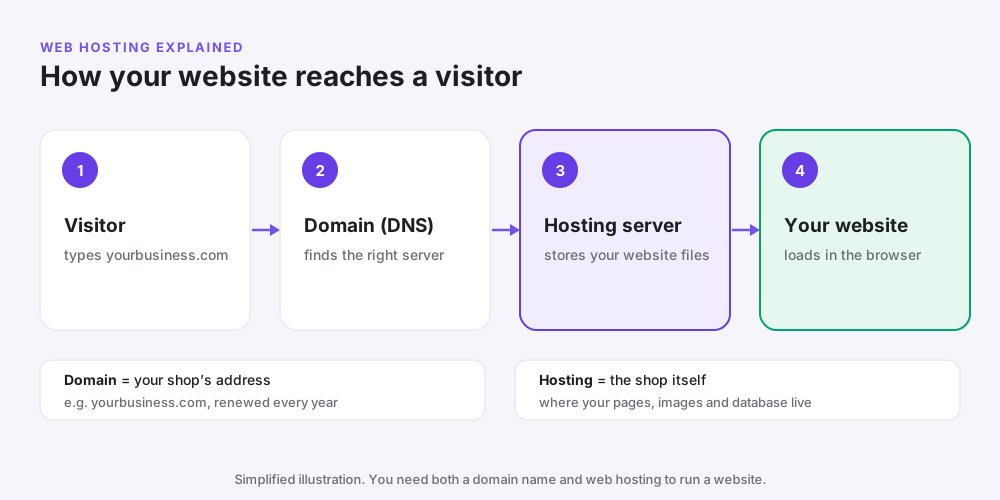
Your host decides how fast your site loads, how often it goes down, and how safe it is from hackers. A slow or unreliable host costs you visitors, sales and Google rankings.
The main types of hosting
| Type | What it means | Cost | Difficulty | Best for |
|---|---|---|---|---|
| Shared hosting | Your site shares one server with others | Lowest | Very easy | Beginners, blogs, small business sites |
| Cloud hosting | More resources, spread across servers | Medium | Easy | Growing sites |
| VPS hosting | Your own virtual server | Medium | Hard | Developers |
| Managed WordPress | The host handles all technical work | High | Very easy | Business-critical sites |
When to use shared hosting: your first website, a blog, a portfolio, or a small business site with up to a few thousand visitors a day. When not to: a large online store, a site with heavy traffic spikes, or a custom app that needs special server software.
What beginners actually need from a host
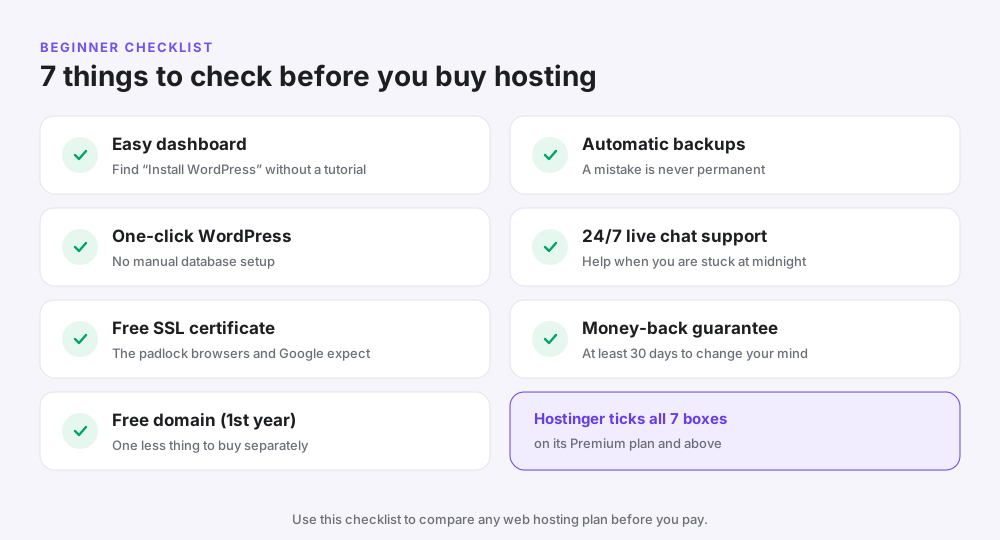
Beginners don’t need the most powerful server. They need a host that is easy, affordable, safe and forgiving when they make mistakes. Use this checklist before you buy any hosting plan:
- Easy dashboard. You should find the “Install WordPress” button without a tutorial.
- One-click WordPress install. No manual database setup.
- Free SSL certificate. The padlock in the browser, which Google expects.
- Free domain for the first year. One less thing to buy separately.
- Automatic backups. So a mistake is never permanent.
- 24/7 live chat support. Help when you are stuck at midnight.
- Money-back guarantee. At least 30 days to change your mind.
Common mistake: choosing a host only because it is the cheapest for month one. Always check the renewal price, which is what you will pay for years.
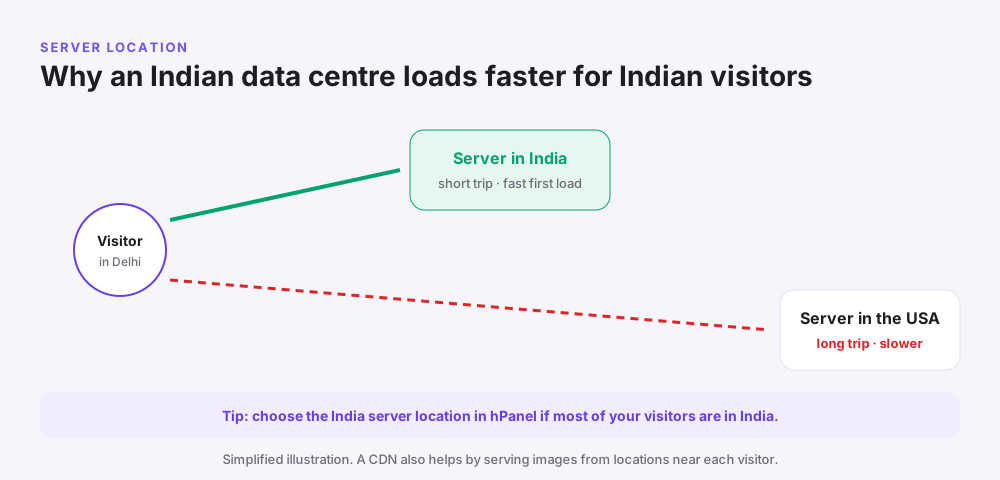
Pro tip: check that the host has a data centre near your visitors. For an Indian audience, that means India or Singapore, which keeps pages fast on mobile data.
Why Hostinger is the best web hosting for beginners
Hostinger ticks all seven boxes on the checklist, at a price most first-time site owners can afford. Here is why it stands out.
1. The hPanel dashboard is genuinely easy
Hostinger uses its own control panel, hPanel, instead of the older cPanel. Buttons are labelled in plain language, and the most common tasks sit on the home screen: install WordPress, connect a domain, create an email account.
Why it matters: beginners lose hours hunting through cluttered dashboards. hPanel removes that friction, so you spend your time on content instead of settings.
2. One-click WordPress and an AI website builder
You can install WordPress in about a minute with a guided setup that also adds a theme and essential plugins. If WordPress feels like too much, Hostinger’s AI website builder drafts a site from a short description of your business, which you then edit by dragging and dropping.
Use the builder for a simple one- to five-page business site you want live today. Use WordPress for a blog, a site you plan to grow, or anything that needs plugins and SEO control.
3. Free domain, SSL and email
- A free domain for the first year (Premium and above)
- Free SSL certificates for every site
- Free email mailboxes on your domain, such as hello@yourbusiness.com
Why it matters: buying a domain, SSL and email separately adds cost and extra setup steps that are easy to get wrong. Having them in one dashboard means one bill, one login and one support team.
4. Speed and an Indian data centre
Hostinger runs LiteSpeed web servers with a built-in caching plugin for WordPress, and the India plans include a CDN that serves images from locations close to your visitors.
Hostinger also has a data centre in India, so sites for Indian audiences can be hosted close to their visitors. That lowers load times compared with hosts that only offer US or European servers.
5. 24/7 support and a 30-day refund
Hostinger offers 24/7 live chat support, plus an AI assistant for quick answers. Every web hosting plan has a 30-day money-back guarantee, so you can try it with almost no risk. Domain registrations are usually not refundable, so read the refund policy before you cancel.
How to use the refund window well: in your first 30 days, install WordPress, publish a few pages, test the speed on your phone and ask support one question. If anything feels wrong, you can still get your money back.
Hostinger web hosting plans and prices in India (2026)
These are Hostinger’s India web hosting plans, checked on hostinger.com/in on 15 October 2026. Prices are per month on a 48-month term and exclude 18% GST.
| Plan | Intro price | Renewal | Websites | Storage | Backups |
|---|---|---|---|---|---|
| Single | ₹69/mo | ₹289/mo | 1 | 10 GB SSD | Weekly |
| Premium ⭐ | ₹149/mo | ₹449/mo | 3 | 20 GB SSD | Weekly |
| Unlimited | ₹249/mo | ₹649/mo | Unlimited* | 50 GB NVMe | Daily |
| Cloud Startup | ₹599/mo | ₹1,599/mo | Unlimited* | 100 GB NVMe | Daily + on demand |
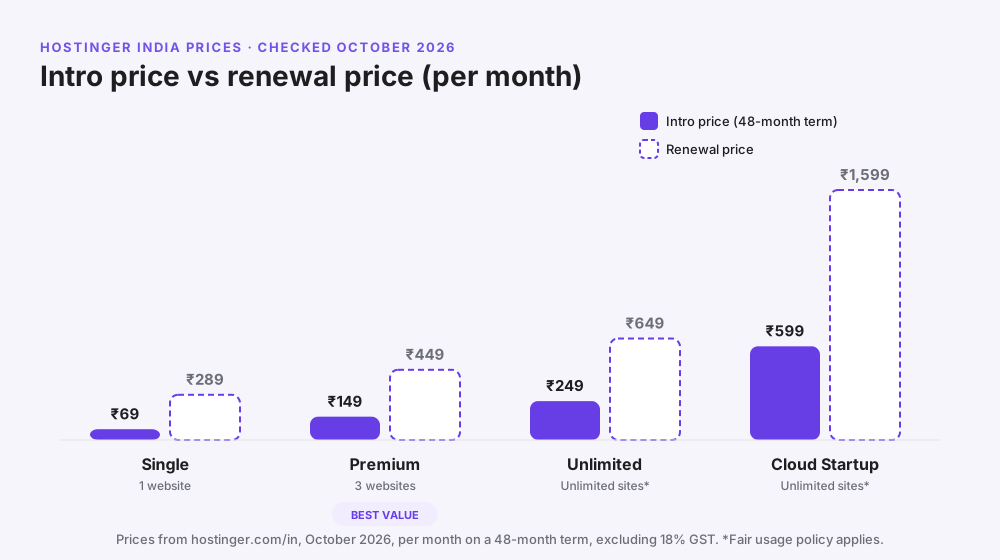
Intro price vs renewal price
The low price is an introductory price for your first term. When the term ends, the plan renews at the regular price, which is about 3× higher. The trick is to lock in the long term at the start, because the intro price applies to the whole term you pay for.
The real 4-year cost (worked example)
| Item | Calculation | Amount |
|---|---|---|
| Premium hosting, first 4 years | ₹149 × 48 months | ₹7,152 |
| GST at 18% | ₹7,152 × 0.18 | ₹1,287 |
| Total paid upfront | ₹8,439 | |
| Effective monthly cost | ₹8,439 ÷ 48 | ≈ ₹176/month |
| Next 4 years (renewal) | ₹449 × 48 months | ₹21,552 + GST |
Takeaway: at under ₹200 a month for four years, Premium is one of the cheapest ways to run a professional website in India. Budget for the renewal from year five, or move up a plan if your site has grown by then.
Common mistake: choosing a 1-month or 12-month term to “test it”. Shorter terms cost much more per month, and the 30-day refund already lets you test risk-free. To save a little more, enter coupon code GETTOMARKETING10 at checkout; our Hostinger coupon page shows how to apply it.
Which Hostinger plan should a beginner buy?
For most beginners, the Premium plan is the best value. It hosts up to 3 websites, includes a free domain and email for the first year, and costs only ₹80 a month more than Single.
| If you are… | Buy this plan | Why |
|---|---|---|
| Testing one hobby blog or portfolio | Single | Cheapest, enough for 1 small site |
| A blogger, freelancer or small business | Premium ⭐ | Free domain, email, 3 sites, best value |
| Running several sites or a small store | Unlimited | Daily backups, NVMe storage, more room |
| Expecting real traffic or running WooCommerce | Cloud Startup | More resources and speed headroom |
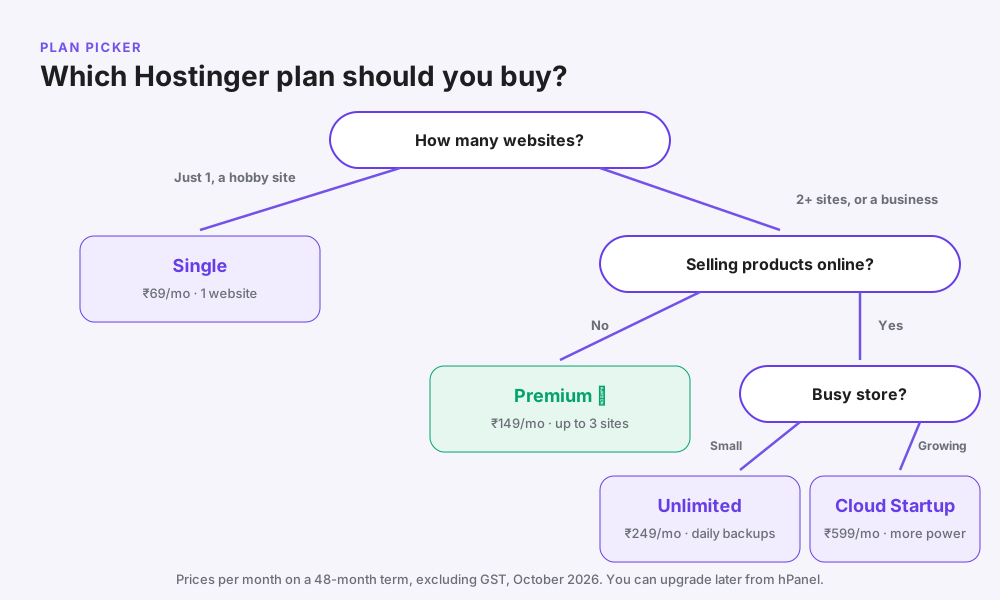
Hostinger Premium vs Unlimited (formerly Business)
- Choose Premium if you have 1–3 sites and are just starting. Weekly backups are fine when you post a few times a month.
- Choose Unlimited if you will run more than 3 sites, sell products online, or want daily backups and faster NVMe storage.
Pro tip: you can upgrade later from hPanel in a few clicks. Start on Premium and upgrade only when you need to.
Hostinger pros and cons
| Pros | Cons |
|---|---|
| Very low starting price in India | Renewal prices are about 3× the intro price |
| Easy hPanel dashboard built for beginners | Lowest prices require a 48-month term |
| One-click WordPress and an AI website builder | Free domain and email are free for the first year only |
| Free SSL, CDN and email included | Weekly (not daily) backups on Single and Premium |
| Data centre in India for faster local loading | No phone support; help is chat and email |
| LiteSpeed servers with built-in caching | Shared hosting has limits for big traffic spikes |
| 24/7 chat support and a 30-day refund | Prices exclude 18% GST |
Hostinger vs other beginner hosts
Here is how Hostinger compares with other hosts that beginners in India often consider. Prices change often, so compare the renewal price and term length on each host’s site before you decide.
| Feature | Hostinger | GoDaddy | Bluehost | MilesWeb | Cloudways |
|---|---|---|---|---|---|
| Type | Shared + cloud | Shared | Shared | Shared | Managed cloud |
| Beginner ease | Excellent | Very good | Very good | Very good | Good |
| Control panel | hPanel | cPanel | Custom | cPanel | Custom |
| Indian data centre | Yes | Check plan | Check plan | Yes | Yes (Mumbai) |
| Starting cost | Very low | Low | Low | Low | From about $11/mo |
| Best for | First sites on a budget | Brand familiarity | WordPress beginners in the US | Local Indian support | Growing sites and agencies |
Bottom line: for a first website with an Indian audience, Hostinger gives the best mix of price, ease and features. When your site outgrows shared hosting, read our Cloudways review or Kinsta review for the next step up.
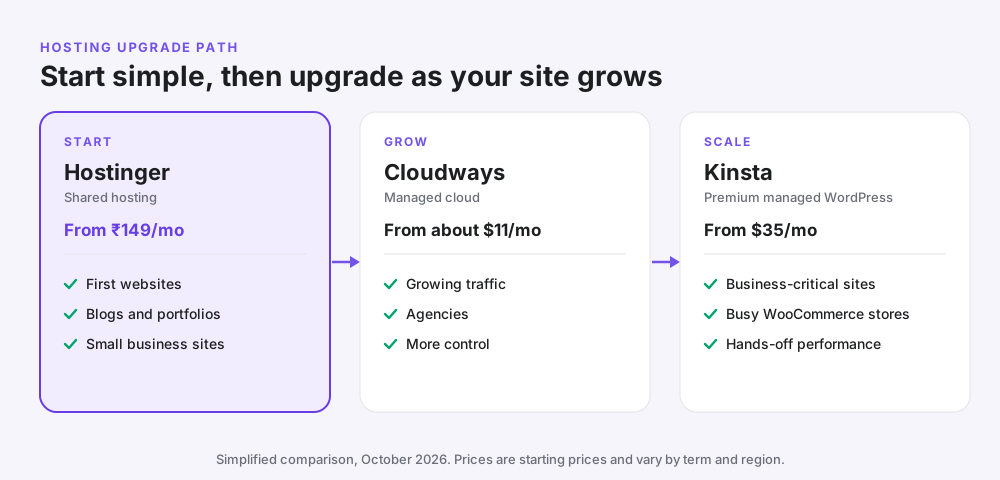
When Hostinger is not the right choice
- You expect heavy traffic from day one, such as a news site or a big product launch. Look at cloud or managed hosting instead.
- You run a large WooCommerce store with hundreds of daily orders. A managed host like Kinsta or a Cloudways server will handle the load better.
- You need phone support. Hostinger’s support is chat and email only.
- You can’t pay for 4 years upfront. Short terms cost much more per month, and another host’s monthly plan may work out cheaper for you.
- You need special server software such as custom Node.js apps or root access. Choose a VPS.
The best web hosting for beginners is the one that fits your situation, not the one with the cheapest banner price.
How to buy hosting from Hostinger and launch your first site
Follow these steps to go from zero to a live WordPress site in about 20 minutes.
- Open Hostinger’s web hosting page. Use this link and choose the Premium plan.
- Select the 48-month term and apply the coupon. The 48-month term gives the lowest monthly price. At checkout, click “Have a coupon code?”, enter GETTOMARKETING10 and click Apply (see our Hostinger coupon page for details).
- Create your account. Sign up with Google or email and pay by UPI, card or net banking.
- Claim your free domain. Do it in hPanel (Premium and above). Choose a short .com or .in name that is easy to spell.
- Choose your server location. Pick India if most of your visitors are in India.
- Install WordPress. Use the one-click installer, or choose the AI website builder.
- Pick a theme and add pages. Start with Home, About, Services and Contact.
- Check SSL is active. The padlock should appear in your browser; turn it on in hPanel if it doesn’t.
- Create your business email. For example, hello@yourdomain.com.
- Connect Google Search Console. So Google can find your site. Our SEO guide shows how.
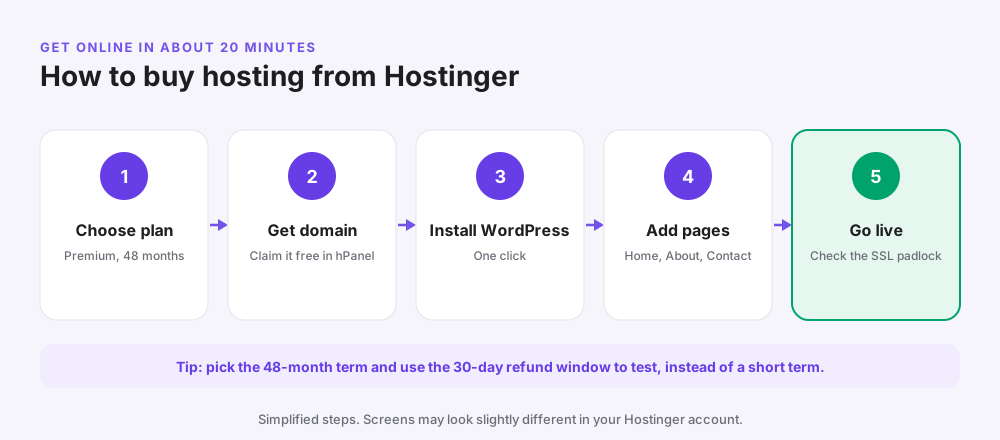

Mini case studies
These are illustrative scenarios based on common beginner set-ups, not specific clients.
A home baker in Chandigarh
Goal: a simple site with a menu, photos and a WhatsApp order button. Choice: Hostinger Single with the AI website builder, live the same afternoon for under ₹4,000 for four years including GST. Lesson: for a five-page brochure site, you don’t need WordPress or a bigger plan.
A finance blogger starting out
Goal: a WordPress blog that can grow, plus a second niche site later. Choice: Hostinger Premium with a free .com domain and a hello@ email address. Lesson: Premium’s extra sites and free domain make it the best value for bloggers.
A D2C brand outgrowing shared hosting
Goal: a WooCommerce store that slowed down during sale weeks. Choice: started on Hostinger Unlimited, then upgraded to Cloud Startup inside hPanel once orders grew. Lesson: start small and upgrade when traffic proves you need it.
Common beginner hosting mistakes
- Ignoring the renewal price. Always budget for year five onwards.
- Buying a short term to “test”. Use the 30-day refund instead.
- Forgetting GST. Add 18% to every price you see.
- Picking a far-away server. Choose India for Indian visitors.
- Buying add-ons you don’t need. Skip paid extras at checkout at first.
- Not turning on SSL. Browsers warn visitors about sites without the padlock.
- Never taking a backup before changes. Make a manual backup before updating themes or plugins.
- Installing too many plugins. Each one can slow your site down.
Pro tips to get more from Hostinger
- Turn on the LiteSpeed Cache plugin in WordPress for faster pages.
- Use the CDN included with your plan, especially if you have visitors abroad.
- Compress images to WebP before uploading; keep most under 150 KB.
- Set a renewal reminder 30 days before your term ends to compare options.
- Bring in visitors once the site is live: our Meta ads beginners guide shows how to get your first customers.
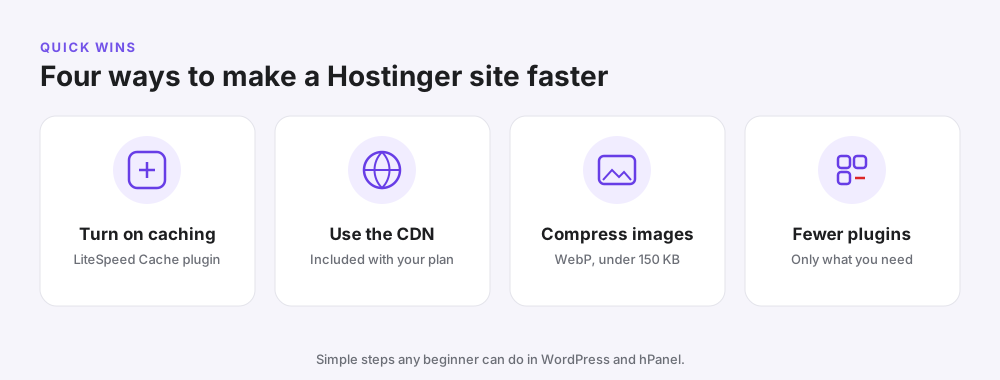
Frequently asked questions
What is the best web hosting for beginners?
Hostinger is the best web hosting for beginners in 2026 for most people. It is cheap to start, easy to use and includes a free domain, SSL, email and a 30-day refund.
Is Hostinger good for beginners?
Yes. Its hPanel dashboard is simpler than cPanel, WordPress installs in one click, and 24/7 chat support helps when you get stuck.
Is Hostinger good in India?
Yes. Hostinger has a data centre in India, prices in rupees, accepts Indian payment methods, and its Premium plan starts at ₹149 a month on a 48-month term (before GST).
What is Hostinger used for?
Hostinger is used to host websites such as blogs, business sites, online stores and portfolios. It also sells domains, business email, VPS and cloud hosting.
Is Hostinger free?
No. Hostinger has no free hosting plan, but most plans include free extras such as a domain for the first year, SSL certificates and email.
Which Hostinger plan is best for beginners?
Premium is the best value for most beginners. It hosts up to 3 websites, includes a free domain and email for the first year, and costs ₹149 a month on a 48-month term.
What is the difference between Hostinger Premium and Business?
Hostinger’s Business plan is now called Unlimited in India. Compared with Premium, it adds unlimited websites (fair use), daily backups and faster NVMe storage.
Why does Hostinger renewal cost more?
The low price is an introductory offer for your first term. At renewal, plans move to the regular price, which is about three times higher, so buy a long term to lock in the low price for longer.
Does Hostinger give a free domain?
Yes, on Premium and higher plans for the first year. After that the domain renews at the normal rate.
Is Hostinger good for domain registration?
Yes. Domains are easy to manage in the same hPanel dashboard as your hosting, which keeps things simple for beginners.
What is Hostinger’s refund policy?
Hostinger offers a 30-day money-back guarantee on hosting. Domain registrations and some add-ons are usually not refundable.
Is Hostinger good for WordPress?
Yes. It offers one-click WordPress installs, LiteSpeed servers with a caching plugin, free SSL and automatic updates, which suits most WordPress beginners.
Is Hostinger good for ecommerce?
For small stores, yes. Unlimited or Cloud Startup is the better choice for WooCommerce because of daily backups and more resources; large stores should consider managed hosting.
How do I buy hosting from Hostinger?
Choose a plan, pick a 48-month term, create an account, pay, claim your free domain, then install WordPress from hPanel. The whole process takes about 20 minutes.
Can I move my website to Hostinger later?
Yes. Hostinger offers free website migration on its hosting plans; you request it from hPanel and its team moves the site for you.
Related reading
- Hostinger coupon code and current prices
- Cloudways review 2026
- Kinsta review 2026
- How to do SEO of your website
Conclusion: is Hostinger the best web hosting for beginners?
For a first website in 2026, especially one aimed at visitors in India, Hostinger is the best web hosting for beginners. It is affordable, easy to use and includes almost everything you need: a free domain, SSL, email, backups and a CDN.
Pick the Premium plan on a 48-month term, choose the India server, and you can have a professional site live today for under ₹200 a month. Just plan for the renewal price, and upgrade when your traffic grows. Use coupon code GETTOMARKETING10 at checkout for an extra discount. Ready? Choose your Hostinger plan and launch your first website this week.
1 thought on “Best Web Hosting for Beginners in 2026: Why We Recommend Hostinger”