
Is Kinsta worth the higher price? In this Kinsta WordPress hosting review, we look at how Kinsta works, what its plans cost in 2026, the features you get, how it performs for visitors in India, and who should (and should not) pay for it. In short: Kinsta is premium managed WordPress hosting built on Google Cloud and Cloudflare. It starts at $35 a month ($30 a month billed yearly), takes almost all server work off your plate, and is one of the best choices for business-critical WordPress and WooCommerce sites. It is not the cheapest option, and for a small hobby blog it is more than you need.
Kinsta at a glance (October 2026)
- Hosting type
- Managed WordPress hosting
- Starting price
- $35/month, or $30/month billed yearly
- Infrastructure
- Google Cloud + Cloudflare Enterprise
- Data centre in India
- Yes, Mumbai
- Free migrations
- Unlimited
- Refund
- 30-day money-back guarantee
Disclosure: links to Kinsta in this review are affiliate links. If you sign up through them we may earn a commission, at no extra cost to you. Prices were checked on the Kinsta pricing page in October 2026 and can change.
What is Kinsta?
Kinsta is a managed hosting company that specialises in WordPress. Founded in 2013, it is known for speed, security and support rather than rock-bottom prices. Every site runs on Google Cloud’s premium network using compute-optimised machines, and traffic passes through Kinsta’s Cloudflare Enterprise integration, which adds a global CDN, edge caching, a web application firewall and DDoS protection.
“Managed” means Kinsta does the server work for you: it sets up and tunes the server, applies security patches, takes daily backups, monitors uptime and helps when something breaks. You manage your sites from MyKinsta, Kinsta’s own dashboard, instead of cPanel.
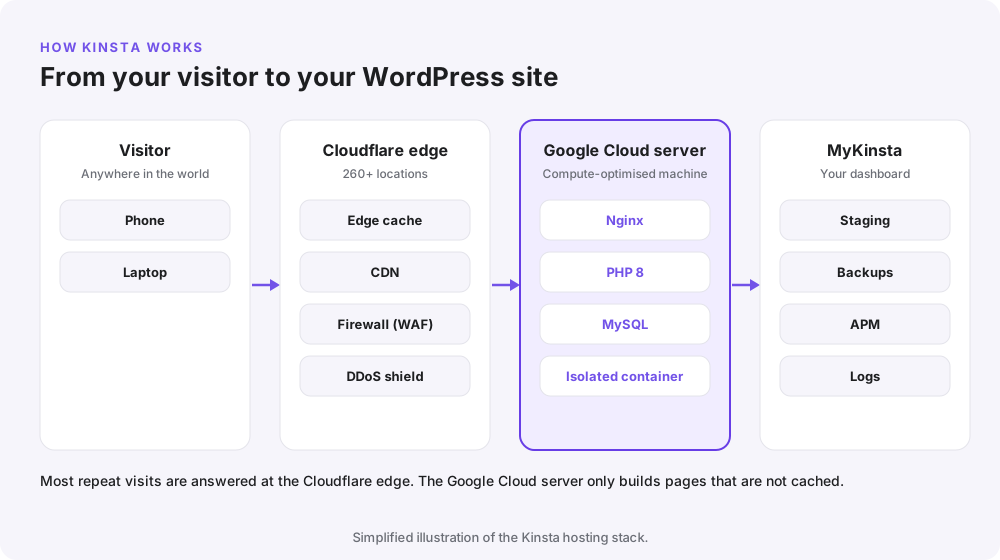
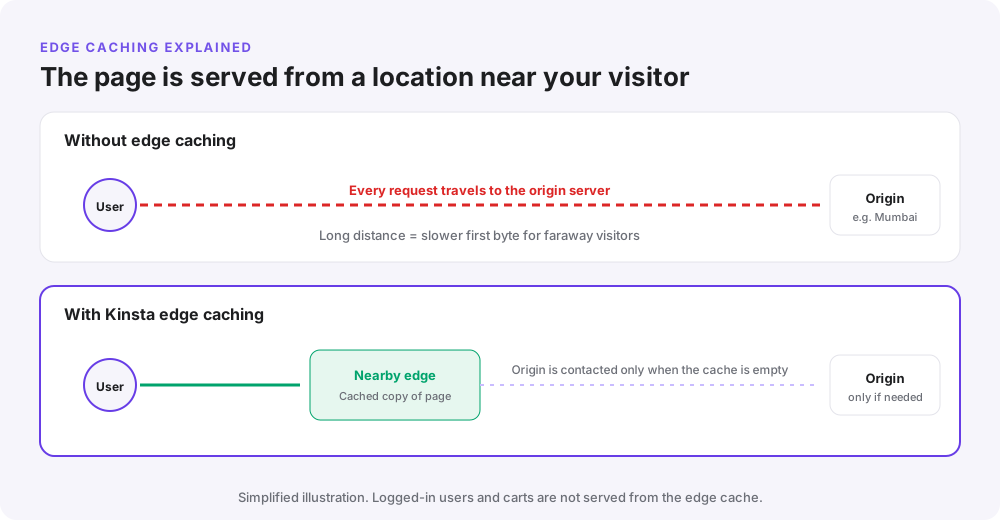
The diagram above shows the key idea. Most visits are answered by Cloudflare’s edge, close to the visitor. Only requests that cannot be cached, such as a logged-in user or a WooCommerce cart, reach the Google Cloud server that runs WordPress.
Kinsta pricing in 2026
Kinsta prices plans by the number of sites, plus either monthly visits or bandwidth, whichever suits your site better. Billing yearly saves about 16% (roughly two months free). There are no long contracts on monthly plans and no price jump at renewal.
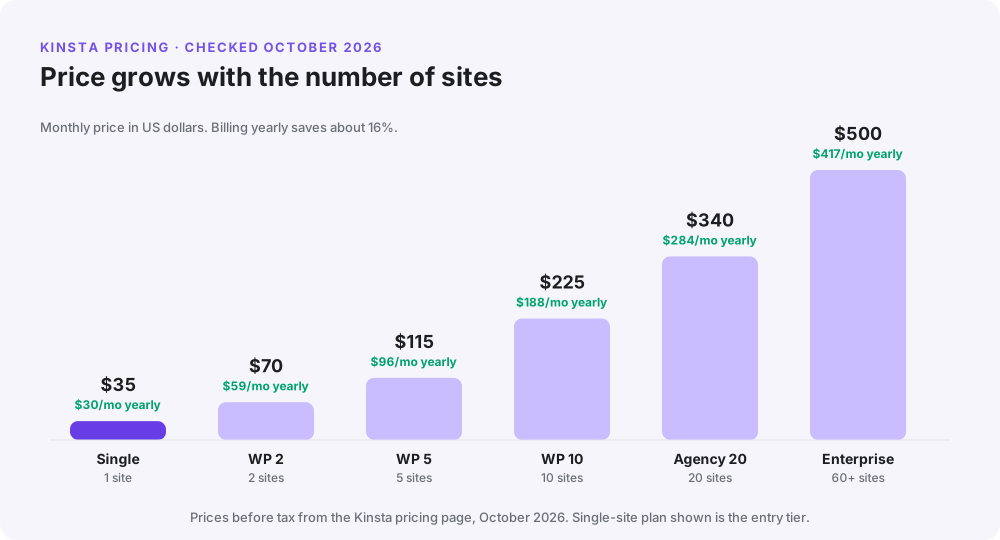
| Plan | Sites | Monthly price | Billed yearly | Includes |
|---|---|---|---|---|
| Single (entry) | 1 | $35 | $30/month | 35,000 visits or 20 GB bandwidth, 10 GB storage, 125 GB CDN |
| WP 2 | 2 | $70 | $59/month | 70,000 visits, 20 GB storage, 250 GB CDN |
| WP 5 | 5 | $115 | $96/month | 125,000 visits, 30 GB storage, 500 GB CDN |
| WP 10 | 10 | $225 | $188/month | 315,000 visits, 40 GB storage, 750 GB CDN |
| Agency 20 | 20 | $340 | $284/month | 500,000 visits, 50 GB storage, 1,000 GB CDN |
| Enterprise | 60+ | From $500 | From $417/month | Custom resources |
Visits or bandwidth: which should you choose?
This is the most confusing part of Kinsta pricing, so here is the simple version. A visit is one unique visitor in 24 hours, however many pages they open. Bandwidth is the amount of data your server sends out. Images and other files served by the CDN have their own separate CDN allowance.
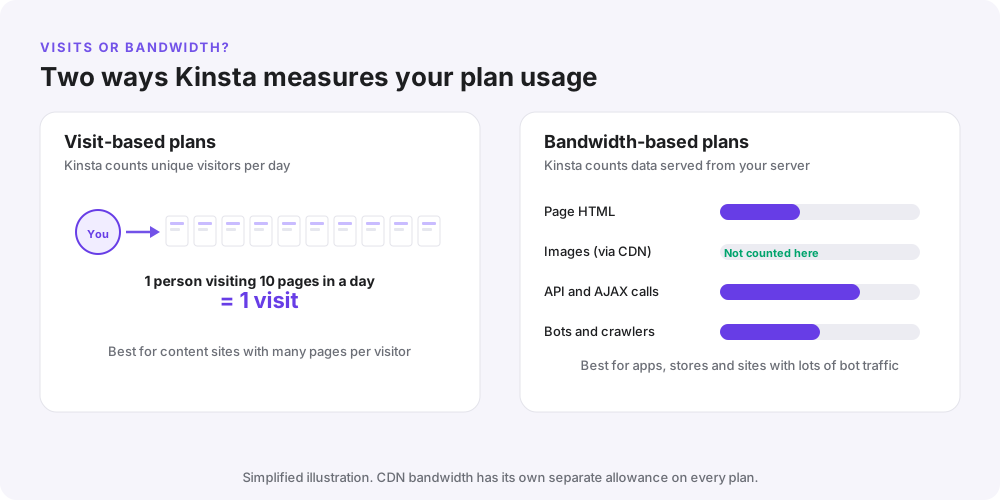
Choose visit-based plans for blogs and content sites where people read several pages. Choose bandwidth-based plans if your site gets a lot of bot traffic, API calls or visitors who view just one page. If you go over your plan, Kinsta bills the extra, so check your usage in MyKinsta and move up a tier if you are regularly over.
Free trial, refunds and add-ons
- First month free on selected plans for new customers.
- 30-day money-back guarantee on all plans.
- Unlimited free migrations done by Kinsta’s team.
- Paid add-ons include extra disk space ($20/month per 20 GB), more PHP performance ($10/month per 500 MB), Redis object caching ($100/site/month) and external backups ($2/site/month).
You can see the current plans and any offer for your region on the Kinsta pricing page.
Kinsta performance and speed
Kinsta’s speed comes from three layers working together: fast servers, isolation between sites, and caching at the edge.

Google Cloud compute-optimised machines
Kinsta runs on Google Cloud’s premium tier network and uses compute-optimised virtual machines, which are designed for fast single-thread performance. That matters for WordPress, because PHP builds each uncached page on a single CPU thread.
Each site in its own container
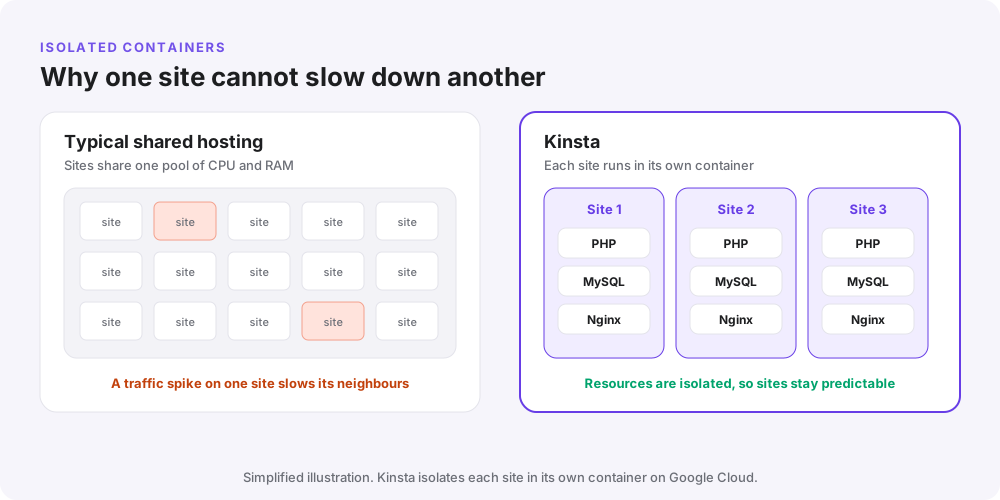
On cheap shared hosting, hundreds of sites share one pool of CPU and memory, so a traffic spike on one site can slow the others. Kinsta places each site in its own isolated container with its own PHP, MySQL and Nginx.
Cloudflare Enterprise and edge caching
Every Kinsta plan includes the Cloudflare Enterprise integration: a CDN with 260+ locations, HTTP/3, a managed firewall and DDoS protection. Edge caching goes a step further by storing whole HTML pages at Cloudflare’s edge, so a visitor in Delhi, Dubai or London gets the page from a nearby location instead of waiting for your origin server.
Kinsta also has a 99.9% uptime guarantee and checks every site around the clock, so problems are spotted quickly.
Key Kinsta features
MyKinsta dashboard
MyKinsta is clean and fast. From one screen you can add sites, manage domains and DNS, issue free SSL certificates (including wildcards), change PHP versions, clear the cache, read logs, create backups and invite team members with different access levels.
Free staging environments
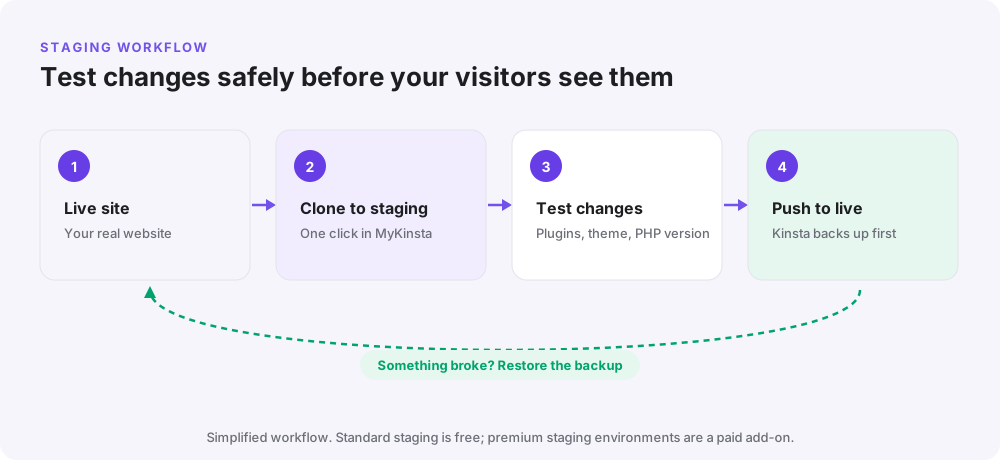
A staging site is a private copy of your website where you can safely test plugin updates, a new theme or a newer PHP version. When everything works, you push the changes live. Kinsta takes a backup of the live site first, so you can roll back if something goes wrong.
Daily backups and easy restores
Kinsta takes automatic backups every day and keeps them for 14 days on most plans (longer on bigger plans). You can also create manual backups before big changes, download a backup, and restore any backup to live or staging in a few clicks. More frequent backups are available as an add-on.
Kinsta APM: find what slows your site
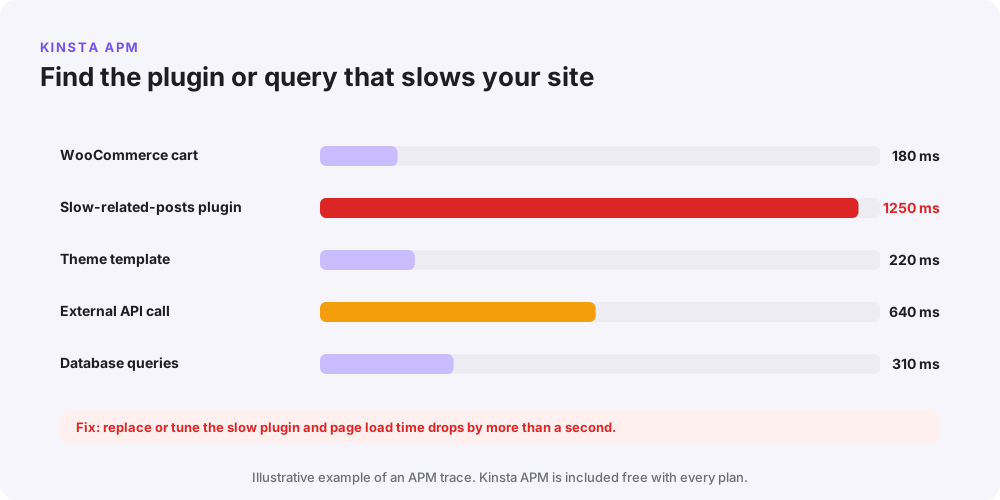
Kinsta includes its own Application Performance Monitoring (APM) tool for free. It records slow PHP processes, database queries and external calls, and shows which plugin, theme function or API is responsible. Instead of guessing, you can see exactly what to fix.
Security
- Managed web application firewall and DDoS protection through Cloudflare
- Free SSL certificates, including wildcard SSL
- Free malware removal if your site is ever hacked
- Two-factor authentication, activity logs and IP blocking in MyKinsta
- Isolated containers, so other customers’ sites cannot affect yours
DevKinsta and developer tools
DevKinsta is a free app for building WordPress sites on your own computer and pushing them to Kinsta staging. Developers also get SSH, WP-CLI, Git, the Kinsta API, and support for multiple PHP versions.

Support
Support is available 24/7 by live chat in English, with support in several other languages during working hours. Agents are WordPress specialists, so they can help with performance and plugin problems, not just server issues. There is no phone support.
Is Kinsta good for websites in India?

Yes. Kinsta has a Google Cloud data centre in Mumbai, which keeps response times low for visitors across India, and Cloudflare’s edge network serves cached pages from locations even closer to them. For sites with visitors both in India and abroad, edge caching helps everyone get a fast page.
Two things to keep in mind: Kinsta bills in US dollars, so the rupee cost changes slightly with the exchange rate, and Kinsta does not provide email hosting or domain registration. Most Indian businesses pair Kinsta with Google Workspace or Zoho Mail for email, and register their domain elsewhere.
Kinsta pros and cons
| Pros | Cons |
|---|---|
| Very fast: Google Cloud machines, isolated containers and edge caching | Expensive compared with shared or cloud hosting |
| Cloudflare Enterprise CDN, firewall and DDoS protection included | No email hosting and no domain registration |
| Excellent MyKinsta dashboard, staging and free APM | Visit and bandwidth limits, with charges for overages |
| Daily backups, free malware removal and SSL | Some plugins are not allowed (mostly caching and backup plugins Kinsta already replaces) |
| Data centre in Mumbai for Indian visitors | Billed in US dollars; no phone support |
| Unlimited free migrations and a 30-day refund | Useful extras like Redis are paid add-ons |
Kinsta vs Cloudways vs Hostinger
These three are often compared, but they solve different problems. The table and diagram below show where each one fits.
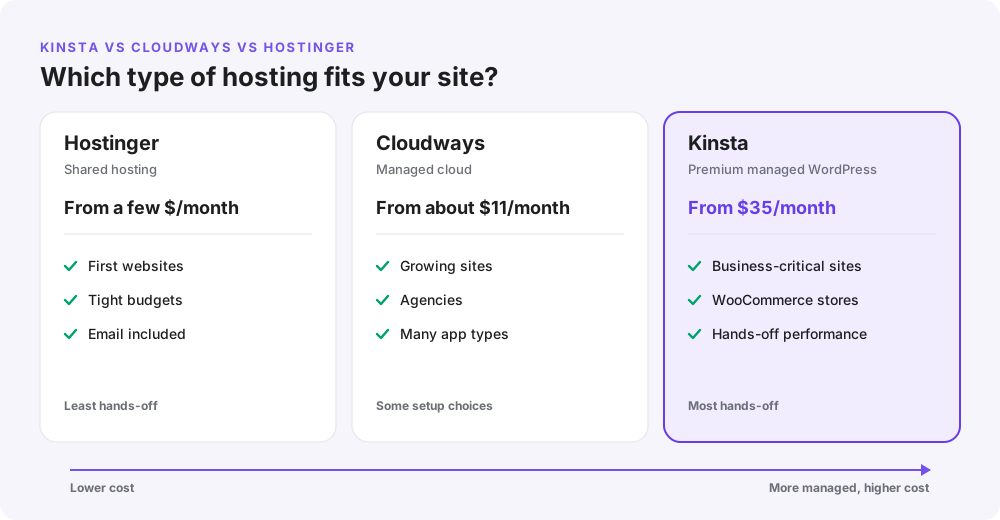
| Hostinger | Cloudways | Kinsta | |
|---|---|---|---|
| Type | Shared and cloud hosting | Managed cloud servers | Premium managed WordPress |
| Starting price | A few dollars a month | About $11/month | $35/month ($30 yearly) |
| Server work | Some | Light | Almost none |
| CDN | Included on most plans | Optional add-on | Cloudflare Enterprise included |
| Email hosting | Included | Paid add-on | Not offered |
| Best for | First websites, tight budgets | Growing sites, agencies, developers | Business-critical WordPress and stores |
If you are curious about the middle option, read our Cloudways review. For a first website on a small budget, see our Hostinger pricing guide.
Who should use Kinsta?

- Businesses whose website brings in leads or sales, where downtime or slowness costs money.
- WooCommerce stores that need fast checkouts and reliable performance during sales.
- Agencies that want one dashboard, staging and white-glove migrations for client sites.
- Busy blogs and publishers with visitors around the world who benefit from edge caching.
Who should not use Kinsta?
- A brand-new blog with little traffic and a tight budget.
- Anyone who wants email hosting and a domain from the same company.
- Sites that are not WordPress (Kinsta’s managed hosting is WordPress-only; other apps use separate hosting products).
How to get started with Kinsta
- Choose a plan on Kinsta’s website. Most single sites start on the entry Single plan.
- Pick visits or bandwidth based on the advice above, and choose yearly billing to save about 16%.
- Select the Mumbai data centre if most of your visitors are in India.
- Request a free migration from MyKinsta, or start a fresh WordPress install.
- Turn on edge caching and point your domain to Kinsta. Then use APM to spot any slow plugins.
Tips to get the most value from Kinsta
- Remove caching and backup plugins; Kinsta already handles both at server level.
- Use staging for every big update, and push only when it works.
- Check visits and bandwidth in MyKinsta monthly, so overages never surprise you.
- Run APM after installing a new plugin to catch slow code early.
- Compress images before upload; the CDN serves them fast, but smaller files are faster still.
Frequently asked questions
Is Kinsta good hosting?
Yes. Kinsta is one of the best managed WordPress hosts for speed, security and support. It runs on Google Cloud with Cloudflare Enterprise, isolates every site and includes staging, daily backups and a free APM tool. The trade-off is a higher price than shared or cloud hosting.
How much does Kinsta cost in 2026?
Kinsta’s single-site plan starts at $35 a month, or $30 a month billed yearly. Multi-site plans start at $70 a month for two sites, agency plans at $340 a month, and enterprise plans at $500 a month. Prices are in US dollars before tax.
Does Kinsta have a data centre in India?
Yes. Kinsta offers a Google Cloud data centre in Mumbai, and its Cloudflare edge network serves cached pages from locations close to visitors across India.
Does Kinsta offer a free trial?
Kinsta offers the first month free on selected plans for new customers, and every plan has a 30-day money-back guarantee.
Does Kinsta include email hosting?
No. Kinsta does not offer email hosting or domain registration. Most users pair it with Google Workspace, Zoho Mail or another email provider.
Is Kinsta better than Cloudways?
They suit different needs. Kinsta is more hands-off and includes Cloudflare Enterprise and edge caching, but costs more. Cloudways is cheaper and more flexible, but you make more choices about servers and add-ons yourself.
Can Kinsta migrate my website for free?
Yes. All Kinsta plans include unlimited free migrations handled by Kinsta’s team, usually within a couple of business days.
What are Kinsta visits?
Kinsta counts one visit for each unique visitor in a 24-hour period, no matter how many pages they view. If you prefer, you can choose a bandwidth-based plan instead.
Related reading
- Cloudways review 2026: features, pricing, pros and cons
- Hostinger 2026: prices and plans compared
- How to do SEO of my website
Our verdict: is Kinsta worth it?
If your WordPress site earns money, Kinsta is worth it. You get some of the fastest WordPress hosting available, a Mumbai data centre for Indian visitors, Cloudflare Enterprise protection, free staging, backups and APM, and expert support, without touching a server. If you are just starting out, a cheaper host makes more sense until your traffic grows. When you are ready, try Kinsta with the 30-day money-back guarantee as your safety net.
3 thoughts on “Kinsta Review 2026: Kinsta WordPress Hosting Pricing, Speed, Pros and Cons”