
Disclosure: this guide contains affiliate links. If you buy Hostinger through them, we may earn a commission at no extra cost to you. We only recommend hosting we use and trust.
Quick answer
WordPress hosting is web hosting that is set up and tuned for WordPress. General web hosting can run almost any website, including WordPress, but you install and look after WordPress yourself. WordPress hosting comes with WordPress pre-installed, caching built for it, automatic updates and support that knows WordPress.
Which do you need? If you are building a WordPress site, choose WordPress hosting or a web hosting plan with one-click WordPress (at Hostinger they are the same plans and prices). Choose general web hosting only if you also need to run non-WordPress apps. Choose managed WordPress hosting if you want the host to handle backups, updates and security for you.
WordPress hosting vs web hosting at a glance (October 2026)
- Web hosting
- Runs any site: WordPress, HTML, PHP apps
- WordPress hosting
- Web hosting tuned and set up for WordPress
- Managed WordPress
- The host also handles updates, backups and security
- Price in India
- From ₹69–₹149/month on Hostinger
- Price in the US
- From $2.99/month on Hostinger; $30+ managed
- Best for most beginners
- Shared WordPress hosting, e.g. Hostinger Premium
In this guide:
- Quick answer
- What is web hosting?
- What is WordPress hosting?
- WordPress hosting vs web hosting: 7 key differences
- Is WordPress hosting just web hosting with a label?
- Types of WordPress hosting
- Pros and cons of each
- When to choose each one
- How much each costs in India and the US
- WordPress hosting vs cloud and VPS hosting
- Real-world scenarios
- How to choose WordPress hosting
- Common mistakes
- Our pick: Hostinger plans for WordPress
- Set up WordPress on Hostinger in 5 steps
- FAQs
You are ready to launch a website, you open a hosting company’s pricing page, and there they are: “Web hosting”, “WordPress hosting”, “Cloud hosting”, “Managed WordPress”. The prices look almost identical. So which button should you click?
Most comparison articles are written by hosting companies that want to sell you the pricier plan. They rarely admit that, at many hosts, WordPress hosting vs web hosting is the same server with a different label.
This guide gives you the honest answer. You will learn what each type really is, the seven differences that matter, real prices in India and the US, and a simple way to pick the right plan in under five minutes.
What is web hosting?
Web hosting is a rented space on a server that is connected to the internet 24/7, where your website’s files and database live. When someone types your domain name, their browser fetches those files from the server and shows your site.
Think of it like renting a shop. The domain name is your shop’s address, the hosting is the building, and your website is everything inside it.
How web hosting works
- You buy a hosting plan and connect your domain name to it.
- You upload your website files, or install an app such as WordPress.
- A visitor types your domain; DNS points their browser to your server.
- The server sends the pages, images and scripts, and your site loads.
Types of web hosting
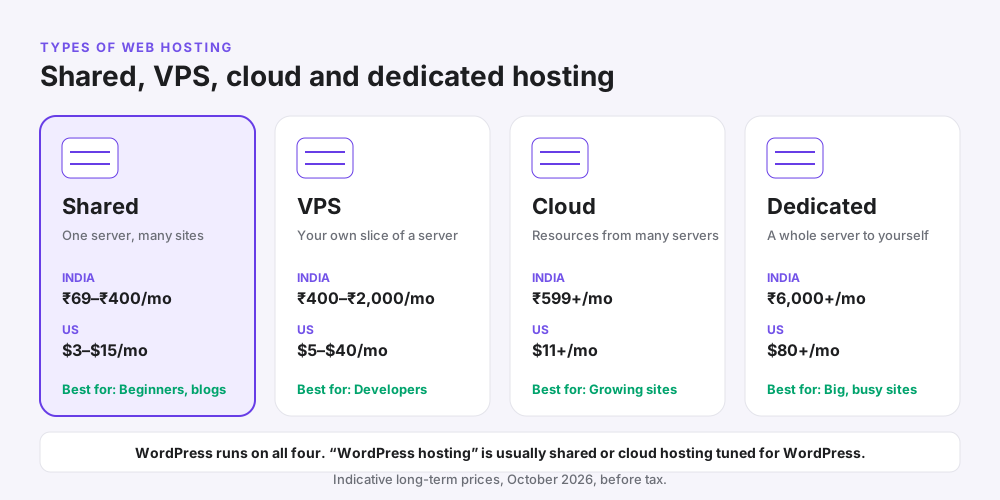
Web hosting comes in four main types. The difference is how many websites share one server and how much power you get.
| Type | What it means | Typical price (India) | Typical price (US) | Best for |
|---|---|---|---|---|
| Shared hosting | Many websites share one server | ₹69–₹400/month | $3–$15/month | New blogs, small business sites |
| VPS hosting | Your own private slice of a server | ₹400–₹2,000/month | $5–$40/month | Developers, custom apps |
| Cloud hosting | Resources drawn from several servers | ₹599+/month | $11+/month | Growing sites and stores |
| Dedicated server | A whole physical server for you | ₹6,000+/month | $80+/month | Large, high-traffic sites |
Why it matters: general web hosting is flexible. You can run WordPress, a plain HTML site, a Laravel app or another CMS on the same plan.
When not to use plain web hosting: if WordPress is the only thing you will ever run, a plan that is already set up for WordPress saves you setup time and usually loads faster.
What is WordPress hosting?
WordPress hosting is web hosting that has been configured specifically to run WordPress. The server software, caching, security rules and support are all tuned for WordPress, and WordPress is usually installed for you on day one.
WordPress powers more than 40% of all websites, according to W3Techs. That is why almost every host now sells a WordPress plan.
What a WordPress hosting plan usually includes
- WordPress pre-installed or installed in one click
- WordPress-specific caching, such as LiteSpeed servers with the LiteSpeed Cache plugin
- Automatic updates for WordPress core, and often for themes and plugins
- Security tuned for WordPress: malware scanning, firewall rules and login protection
- Staging on many plans, so you can test changes on a copy of your site
- Support staff trained on WordPress problems, such as plugin conflicts
Two kinds of WordPress hosting
Shared WordPress hosting is shared hosting with WordPress tools added. It is cheap and perfect for most new sites. Managed WordPress hosting goes further: the host takes care of updates, daily backups, speed and security, so you only manage your content.
Pro tip: check the official WordPress hosting requirements. Any good host, WordPress plan or not, should offer a recent PHP 8 version, MySQL or MariaDB, and free HTTPS.
WordPress hosting vs web hosting: 7 key differences
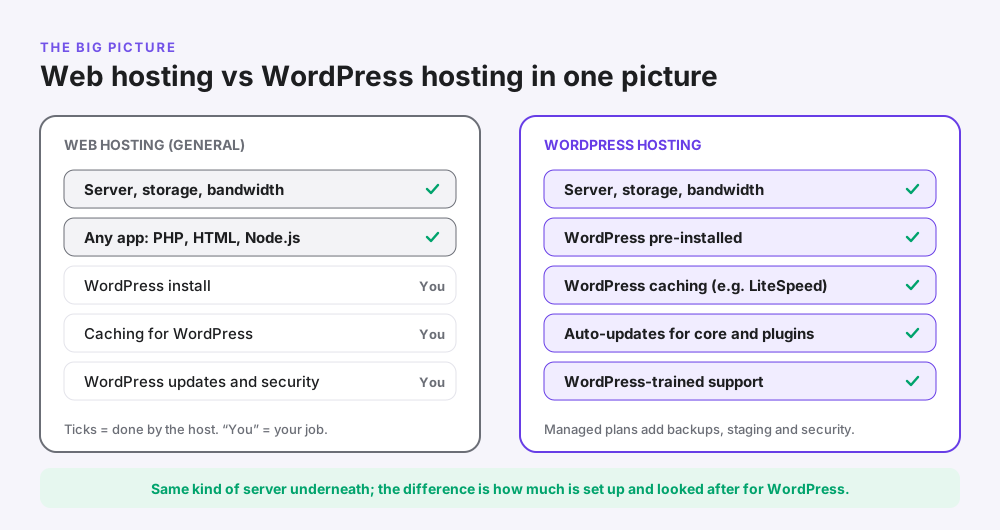
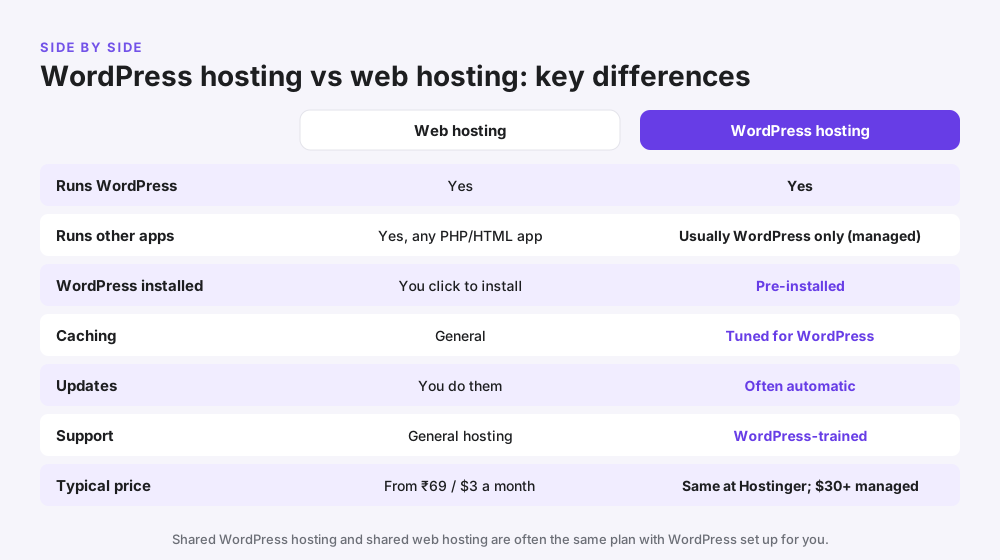
Here is how the two compare side by side. Notice that the server underneath is often the same; the differences are in setup, tuning and care.
| Feature | Web hosting | WordPress hosting |
|---|---|---|
| 1. What it runs | Any website: WordPress, HTML, PHP apps, other CMSs | WordPress (managed plans often run WordPress only) |
| 2. Setup | You install WordPress yourself or in one click | WordPress comes pre-installed |
| 3. Speed tuning | General caching | Caching tuned for WordPress (e.g. LiteSpeed Cache) |
| 4. Updates | You update WordPress, themes and plugins | Core updates automatic; plugins often too |
| 5. Security | General firewall and malware tools | WordPress-specific rules and scanning |
| 6. Support | General hosting support | Staff trained on WordPress issues |
| 7. Price | From ₹69 / $2.99 a month | Same at Hostinger; managed plans $30+ a month |
1. Flexibility
General web hosting wins here. If you want WordPress plus a separate PHP tool, a static landing page or a different CMS, general web hosting lets you run them all. Some managed WordPress hosts block non-WordPress apps entirely.
2. Setup time
WordPress hosting wins. Your site is ready to log in to within minutes. On plain web hosting you can usually install WordPress in a few clicks, so the gap is small at good hosts.
3. Speed
WordPress hosting usually wins because caching and server settings are tuned for WordPress. On LiteSpeed servers, for example, the free LiteSpeed Cache plugin can cache pages at server level.
4. Maintenance
WordPress hosting, and especially managed WordPress hosting, reduces your workload with automatic updates and backups. On general web hosting, keeping WordPress updated is your job.
5. Security
Both can be secure. WordPress plans add protection against attacks that target WordPress, such as login attempts on wp-login.php and vulnerable plugins.
6. Support
If a plugin breaks your site at midnight, WordPress-trained support can save you hours. General support may only check that the server is up.
7. Price
Shared WordPress hosting and shared web hosting usually cost the same. The real price jump comes with managed WordPress hosting, which starts around $30–$35 a month.
Is WordPress hosting just web hosting with a different label?
Often, yes. At many hosts, shared “WordPress hosting” is the same shared server as “web hosting”, with WordPress installed and a few WordPress tools switched on.
Hostinger is a good example. At the time of writing, its WordPress hosting page and web hosting page list the same plans at the same prices: Single, Premium, Unlimited and Cloud Startup. Every plan supports one-click WordPress and WordPress tools, so the label matters less than the plan you pick.
Where the difference is real: managed WordPress hosting from providers such as Kinsta is a different product. It runs on separate infrastructure, includes expert care, and costs several times more.
What this means for you: do not pay more just because a plan says “WordPress”. Compare storage, number of websites, backups, server location and renewal price instead.
Types of WordPress hosting
| Type | What you get | Typical price | Best for | Example |
|---|---|---|---|---|
| Shared WordPress hosting | Shared server tuned for WordPress, one-click install | ₹69–₹250/month or $3–$4/month | New blogs, portfolios, small business sites | Hostinger Premium or Unlimited |
| Cloud WordPress hosting | More CPU and RAM, dedicated IP, more headroom | ₹599+/month or $8+/month | Online stores, busy blogs, agencies | Hostinger Cloud Startup |
| Managed cloud hosting | Your own cloud server, managed for you | From about $11/month | Growing sites that want speed and control | Cloudways |
| Premium managed WordPress | Fully managed, expert support, enterprise CDN | From $35/month ($30 yearly) | High-traffic business sites | Kinsta |
| VPS for WordPress | Full server control; you manage everything | ₹400+/month or $5+/month | Developers comfortable with servers | Any VPS host |
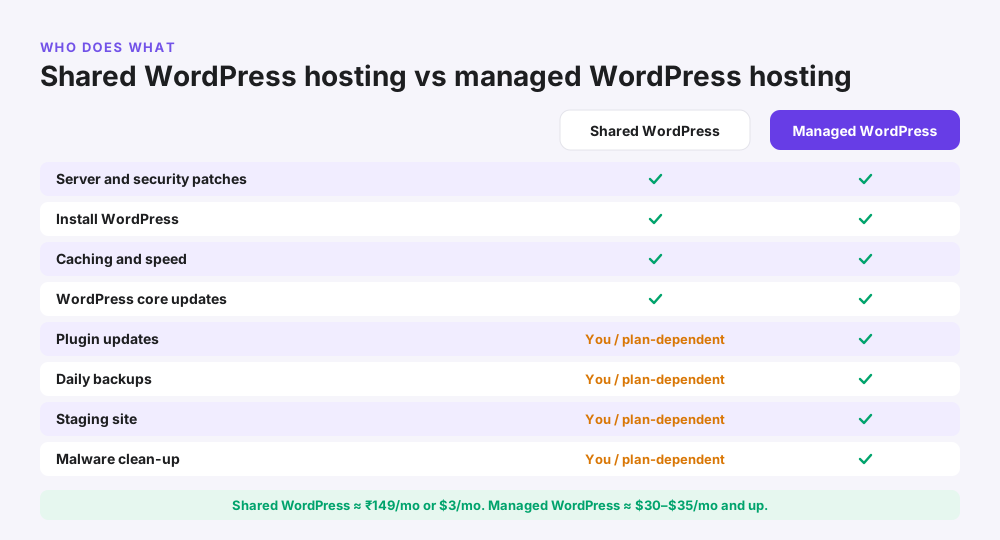
Shared vs managed WordPress hosting
Shared WordPress hosting handles the server, WordPress install, caching and core updates. You handle plugin updates and checking backups. Managed WordPress hosting also takes care of plugin updates, daily backups, staging and malware clean-up.
When managed is worth it: your site earns money every hour, you have no time for maintenance, or downtime would cost you more than $30 a month. When it isn’t: you are starting a blog or a small business site with modest traffic.
Pros and cons of web hosting vs WordPress hosting
General web hosting
| Pros | Cons |
|---|---|
| Runs any website or app, not just WordPress | You install and maintain WordPress yourself |
| Usually the cheapest way to get online | Caching may not be tuned for WordPress |
| Host several kinds of sites on one plan | Support may not help with WordPress issues |
| Easy to switch to a different CMS later | Security updates are your responsibility |
WordPress hosting
| Pros | Cons |
|---|---|
| WordPress ready in minutes | Managed plans may not allow non-WordPress apps |
| Faster out of the box with WordPress caching | Managed plans cost much more |
| Automatic updates and WordPress security | Some hosts limit which plugins you can use |
| Support that understands WordPress | The “WordPress” label is sometimes just marketing |
When to choose web hosting vs WordPress hosting
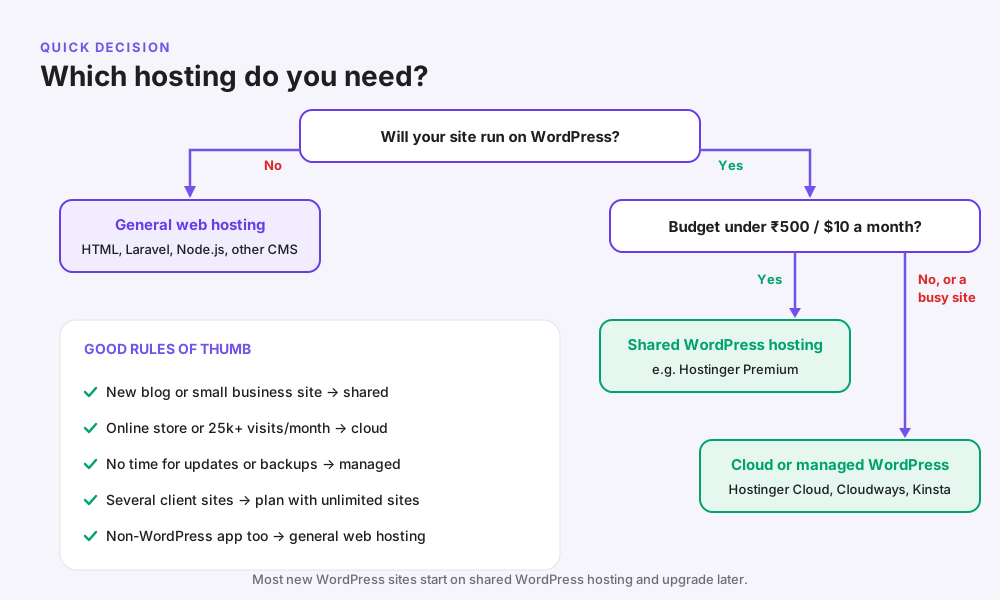
Choose general web hosting if…
- You are building a static HTML site or a custom PHP app
- You want to run WordPress and another tool on the same account
- You might move to a different CMS later
- You are a developer who prefers to set everything up yourself
Choose shared WordPress hosting if…
- You are starting a blog, portfolio or small business website
- Your budget is under about ₹500 or $10 a month
- You expect up to roughly 25,000 visits a month at first
- You want WordPress ready without technical setup
Choose cloud or managed WordPress hosting if…
- You run an online store with WooCommerce
- Your site gets steady traffic or traffic spikes from ads
- Every hour of downtime costs you sales or leads
- You would rather pay than handle updates and backups
Pro tip: you do not have to decide forever. Start on shared WordPress hosting and upgrade to cloud when your traffic grows. At Hostinger, the upgrade is a few clicks inside hPanel.
How much WordPress hosting and web hosting cost in 2026
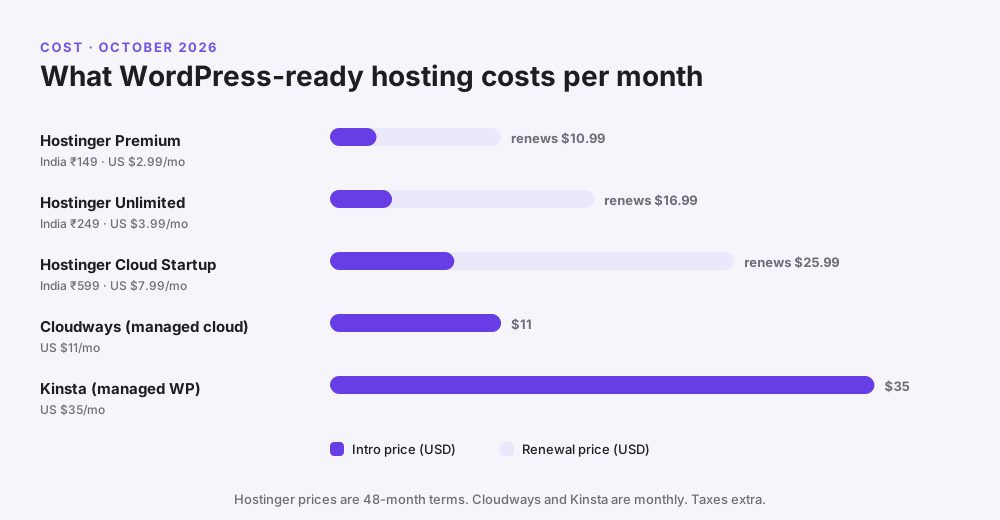
Prices below are the promotional rates on long terms, which is how most people buy hosting. Always check the renewal price too, because that is what you pay from year five.
Hostinger prices in India
| Plan | Intro price | Renews at | Websites | Storage | Backups |
|---|---|---|---|---|---|
| Single | ₹69/month | ₹289/month | 1 | 10 GB SSD | Weekly |
| Premium | ₹149/month | ₹449/month | 3 | 20 GB SSD | Weekly |
| Unlimited | ₹249/month | ₹649/month | Unlimited | 50 GB NVMe | Daily |
| Cloud Startup | ₹599/month | ₹1,599/month | Unlimited | 100 GB NVMe | Daily + on demand |
Hostinger prices in the US
| Plan | Intro price | Renews at | Websites | Storage |
|---|---|---|---|---|
| Premium | $2.99/month | $10.99/month | 3 | 20 GB SSD |
| Unlimited | $3.99/month | $16.99/month | Unlimited | 50 GB NVMe |
| Cloud Startup | $7.99/month | $25.99/month | Unlimited | 100 GB NVMe, 4 CPU cores, 4 GB RAM |
Managed WordPress hosting prices
| Provider | Starting price | Billing | What you get |
|---|---|---|---|
| Cloudways | About $11/month | Hourly, no contract | Managed cloud server (DigitalOcean 1 GB) |
| Kinsta | $35/month, or $30/month yearly | Monthly or yearly | 1 site, 35,000 visits, Google Cloud + Cloudflare Enterprise |
Worked example: four-year cost of a small business site in India
| Item | Amount |
|---|---|
| Hostinger Premium, 48 months (₹149 × 48) | ₹7,152 |
| 18% GST | ≈ ₹1,287 |
| Domain | Free for year one |
| Total upfront for four years | ≈ ₹8,440 (about ₹176 a month) |
Compare that with managed WordPress hosting at $35 a month, which is roughly ₹2,900 a month before tax. For a new site, that money is usually better spent on content or ads.
WordPress hosting vs cloud hosting vs VPS hosting
These terms describe different things. “WordPress hosting” describes what software the plan is tuned for. “Cloud” and “VPS” describe how the server is built.
| Shared WordPress hosting | Cloud hosting | VPS hosting | |
|---|---|---|---|
| Resources | Shared with other sites | Dedicated CPU and RAM from a cloud | Your own virtual server |
| Technical skill | None | Low (if managed) | Medium to high |
| Speed under traffic | Good for small sites | Very good | Very good if tuned |
| Who manages the server | Host | Host (managed) or you | Usually you |
| Starting price | ₹69 / $2.99 a month | ₹599 / $7.99 a month | ₹400 / $5 a month |
In short: a WordPress site can live on any of the three. Most beginners should start on shared WordPress hosting, move to cloud as traffic grows, and only choose a VPS if they enjoy managing servers.
Real-world scenarios: which hosting fits?
These are illustrative examples based on common situations, not specific customers.
A new food blogger in Pune
Need: one WordPress blog, low budget, no technical skills. Best fit: shared WordPress hosting such as Hostinger Premium on a 48-month term, with an India server for faster load times. Our guide on how to start a blog and make money walks through the rest.
A dental clinic in Texas
Need: a five-page business site with a booking form and good local SEO. Best fit: shared WordPress hosting with a US server, such as Hostinger Premium or Unlimited. Daily backups on Unlimited are worth the extra dollar a month.
A growing D2C store running ads
Need: WooCommerce, sales spikes when ads go live, and no downtime. Best fit: cloud WordPress hosting such as Hostinger Cloud Startup, or a managed cloud server on Cloudways. If you run Meta ads to the store, a slow checkout wastes ad spend, so speed matters here.
A developer with a mix of projects
Need: two WordPress sites, a Laravel app and some static pages. Best fit: general web hosting with unlimited websites, or a VPS. A WordPress-only managed host would be too restrictive.
How to choose the best WordPress hosting: an 8-point checklist
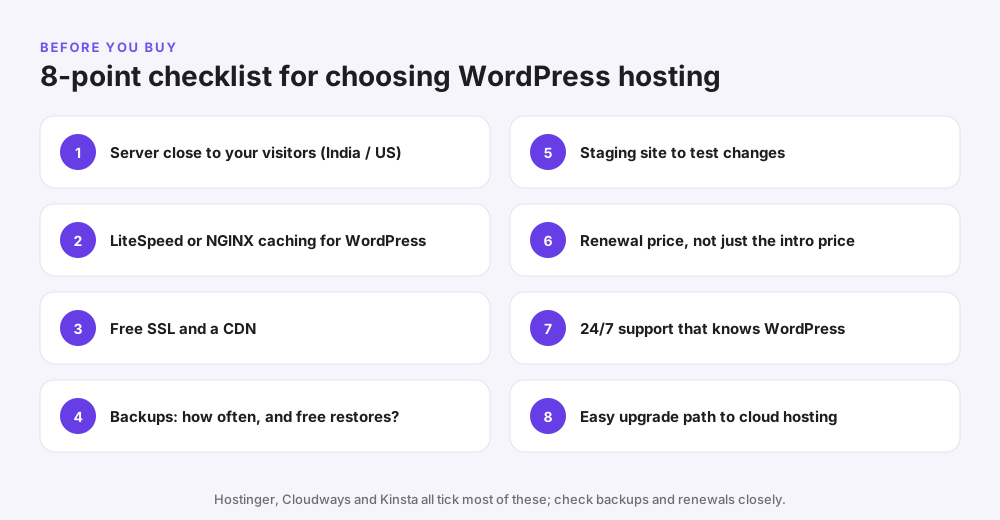
- Server location. Pick a data centre close to your visitors: India for Indian audiences, the US for American ones.
- WordPress caching. Look for LiteSpeed, NGINX or built-in page caching.
- Free SSL and CDN. HTTPS is a must for SEO and trust.
- Backups. Check how often they run and whether restores are free.
- Staging. Useful for testing theme or plugin changes safely.
- Renewal price. Compare what you will pay after the intro term, not just the headline price.
- Support. 24/7 chat with staff who know WordPress.
- Upgrade path. Make sure you can move to cloud hosting without migrating to a new company.
Best practice: buy the longest term you are comfortable with. The low intro price is locked in for the whole term, and most hosts, including Hostinger, offer a 30-day money-back guarantee.
Common mistakes when choosing hosting
- Paying extra for the “WordPress” label. At many hosts it is the same plan; compare features, not names.
- Buying managed WordPress for a brand-new blog. You will pay $30+ a month for traffic you don’t have yet.
- Ignoring renewal prices. A $2.99 plan can renew at $10.99; plan for it.
- Choosing a far-away server. A US server for an Indian audience adds load time.
- Never testing backups. Restore a backup once so you know it works.
- Using a managed WordPress host for non-WordPress apps. Many simply don’t allow it.
- Skipping basic SEO setup after launch. Fast hosting helps, but you still need on-page SEO. See how to do SEO of your website.
Our pick: which Hostinger plan to choose for WordPress
For most beginners and small businesses in India and the US, we recommend Hostinger. It is affordable, has data centres in both India and the US, runs on LiteSpeed servers, and installs WordPress in one click. Because its WordPress and web hosting plans are the same, you get WordPress tools on every plan.
| If you are… | Choose | Why |
|---|---|---|
| Testing a single site on a tight budget | Hostinger Single | Cheapest way to get online (India) |
| Starting your first blog or business site | Hostinger Premium | 3 sites, free domain for year one, free SSL |
| Running a few sites, or want daily backups | Hostinger Unlimited | Unlimited sites, NVMe storage, daily backups |
| Running a store or a busy site | Hostinger Cloud Startup | Dedicated resources, 100 GB NVMe, dedicated IP |
Hostinger WordPress features worth knowing
- One-click WordPress install and an easy dashboard called hPanel
- LiteSpeed web servers with the LiteSpeed Cache plugin
- Automatic WordPress updates and a malware scanner
- Staging tools on higher-tier plans
- Free SSL, and a free domain for the first year from Premium up
- Data centres in India and the US, plus a 30-day money-back guarantee
Want a deeper look? Read our best web hosting for beginners guide, our best hosting in India comparison, and our Hostinger prices and deals page.
How to set up WordPress on Hostinger in 5 steps
- Pick a plan. Open Hostinger, choose Premium or Unlimited, and select a 48-month term for the lowest price.
- Claim your domain. Use the free domain included from Premium up, or connect one you already own.
- Choose WordPress in the setup wizard. Hostinger installs it for you and creates your admin login.
- Pick a server location. Choose India for Indian visitors or the US for American visitors.
- Log in and build. Install a lightweight theme, turn on LiteSpeed Cache, and publish your first pages.
For the full walkthrough with screenshots, follow our guide on how to create a WordPress website.
Frequently asked questions
What is the difference between WordPress hosting and web hosting?
Web hosting can run almost any website, while WordPress hosting is web hosting that is set up and tuned for WordPress, with WordPress pre-installed, WordPress caching, automatic updates and WordPress-trained support.
Do I need WordPress hosting to use WordPress?
No. Self-hosted WordPress runs on any web hosting that offers PHP, MySQL or MariaDB and HTTPS. WordPress hosting simply makes setup, speed and updates easier.
Is WordPress hosting better than web hosting?
For a WordPress-only site, yes, because it is faster to set up and tuned for WordPress. If you need to run other apps too, general web hosting is more flexible.
Is WordPress hosting the same as shared hosting?
Shared WordPress hosting is shared hosting with WordPress tools added. Managed WordPress hosting is a different, more hands-off service that usually costs more.
What is managed WordPress hosting?
Managed WordPress hosting is a service where the host handles WordPress updates, daily backups, caching, security and malware clean-up, so you only manage your content.
How much does WordPress hosting cost?
Shared WordPress hosting starts at about ₹69–₹149 a month in India and $2.99 a month in the US on long terms. Managed WordPress hosting starts at around $30–$35 a month.
Is WordPress hosting free?
WordPress software is free, but reliable hosting is not. Free hosting plans usually have ads, low limits and no support, so they are not suitable for a business site.
Can I run WordPress on regular web hosting?
Yes. Most web hosting plans include a one-click WordPress installer. At Hostinger, every web hosting plan supports WordPress.
Can I host non-WordPress sites on WordPress hosting?
On shared WordPress hosting, often yes. On many managed WordPress hosts, no, because their servers are built only for WordPress.
Is Hostinger WordPress hosting different from its web hosting?
At the time of writing, Hostinger lists the same plans and prices on both pages. You get WordPress tools on every plan, so choose by storage, sites and backups.
Which hosting is best for a WordPress blog?
For a new blog, shared WordPress hosting such as Hostinger Premium is usually the best value. Upgrade to cloud hosting when traffic grows.
Which is better for WordPress: cloud hosting or shared hosting?
Shared hosting is cheaper and fine for new or small sites. Cloud hosting gives dedicated resources and handles traffic spikes better, which suits stores and busy sites.
Does WordPress hosting make my site faster?
Usually, because caching and server settings are tuned for WordPress. Your theme, plugins and images still have a big effect on speed.
Can I switch from web hosting to WordPress hosting later?
Yes. You can migrate your site, and many hosts offer free migration. At Hostinger you can also upgrade between plans inside hPanel.
Should I choose a hosting server in India or the US?
Choose the server closest to most of your visitors. For an Indian audience pick India, and for an American audience pick the US.
Related reading
- Best web hosting for beginners in 2026
- Best hosting in India 2026: 6 picks compared
- How to create a WordPress website (step by step)
- How to start a blog and make money
- Cloudways review 2026
- Kinsta review 2026
Conclusion: WordPress hosting vs web hosting, which should you pick?
The WordPress hosting vs web hosting choice is simpler than it looks. Both run on similar servers. WordPress hosting adds WordPress setup, caching, updates and support, while general web hosting gives you the freedom to run anything.
If you are building a WordPress site, choose a WordPress-ready plan and don’t pay extra for the label alone. Start on shared WordPress hosting, keep an eye on renewal prices, and move to cloud or managed hosting when your traffic and revenue justify it.
Ready to start? Get Hostinger, pick Premium or Unlimited, and you can have WordPress live in about ten minutes. Then follow our guide on how to create a WordPress website to build it.
1 thought on “WordPress Hosting vs Web Hosting: Which Do You Need? (2026 Guide)”