
Disclosure: this guide contains affiliate links to Cloudways and Hostinger. If you buy through them, we may earn a commission at no extra cost to you. Kinsta, DigitalOcean, AWS, Vultr and Google Cloud links are not affiliate links.
Quick answer
The best cloud hosting company for most small businesses in 2026 is Cloudways. It gives you a managed cloud server on DigitalOcean, Vultr, Linode, AWS or Google Cloud from about $11 a month, billed monthly, with no long contract.
On a tight budget, Hostinger Cloud is the cheapest managed option at $7.99 a month on a 48-month term. For a busy WordPress site with premium support, Kinsta starts at $35 a month. If you or your developer can manage a server, DigitalOcean, AWS Lightsail and Vultr start at $4–$5 a month.
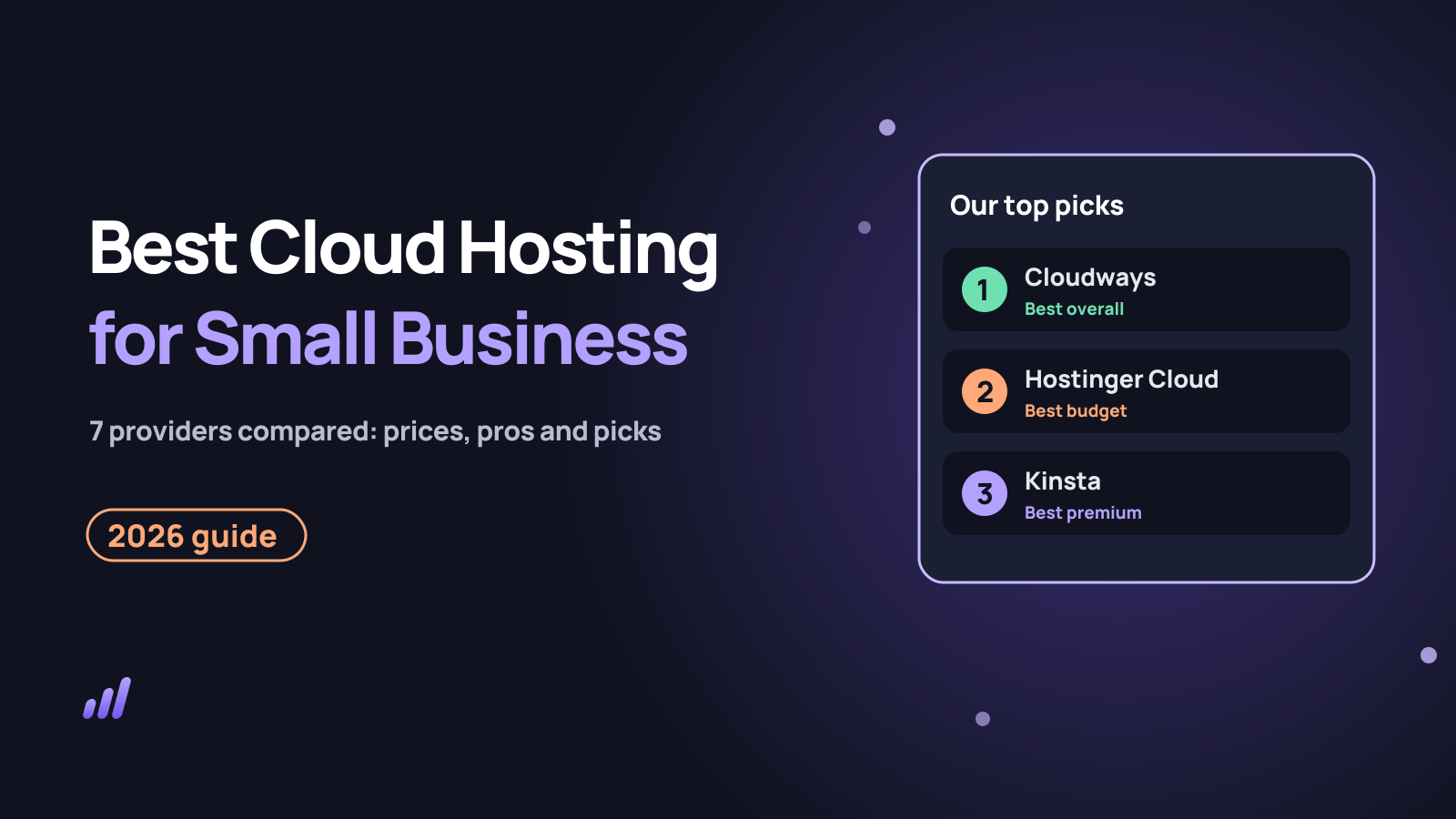
Best cloud hosting for small businesses (2026)
- Best overall
- Cloudways, from $11/month
- Best budget
- Hostinger Cloud, from $7.99/month
- Best premium WordPress
- Kinsta, from $35/month
- Best for developers
- DigitalOcean, from $4/month
- Best AWS starter
- AWS Lightsail, from $5/month
- Most data centres
- Vultr, 33 regions
- Best for custom apps
- Google Cloud, pay as you go
In this guide:
- Quick answer
- How we chose
- Comparison table
- 1. Cloudways
- 2. Hostinger Cloud
- 3. Kinsta
- 4. DigitalOcean
- 5. AWS Lightsail
- 6. Vultr
- 7. Google Cloud
- Prices and real yearly cost
- Managed vs unmanaged
- How to choose
- Best pick by business type
- Mini case studies
- How to get started
- Common mistakes
- Pro tips
- FAQs
Your website is now part of how you make money. When it slows down during a sale or goes offline on a busy Saturday, you lose customers you paid to attract.
Cloud hosting fixes most of that, but the market is confusing. Some “cloud” companies hand you a raw server and walk away, while others manage everything and charge for it. Prices range from $4 to $40 a month for plans that look similar on paper.
This guide compares the best cloud hosting companies for small businesses in 2026. You get real starting prices, honest pros and cons, and a clear pick for each type of business.
How we chose the best cloud hosting companies
We judged each company from the point of view of a small business owner without a full-time developer. These are the criteria we used:
| Criterion | Why it matters for a small business |
|---|---|
| Ease of use | You should be able to launch and manage a site without a server engineer |
| Real price | The monthly cost after any first-term discount, plus add-ons |
| Performance | Fast pages keep visitors and help Core Web Vitals |
| Reliability | Uptime, backups and how easy it is to recover from mistakes |
| Support | 24/7 help when something breaks at a bad moment |
| Room to grow | Scaling up without moving to a new host |
| Locations | Data centres close to your customers, including India and the US |
Prices were checked in October 2026 and are shown in US dollars before tax. Hosting prices change often, so confirm the final price on checkout.
Best cloud hosting companies compared
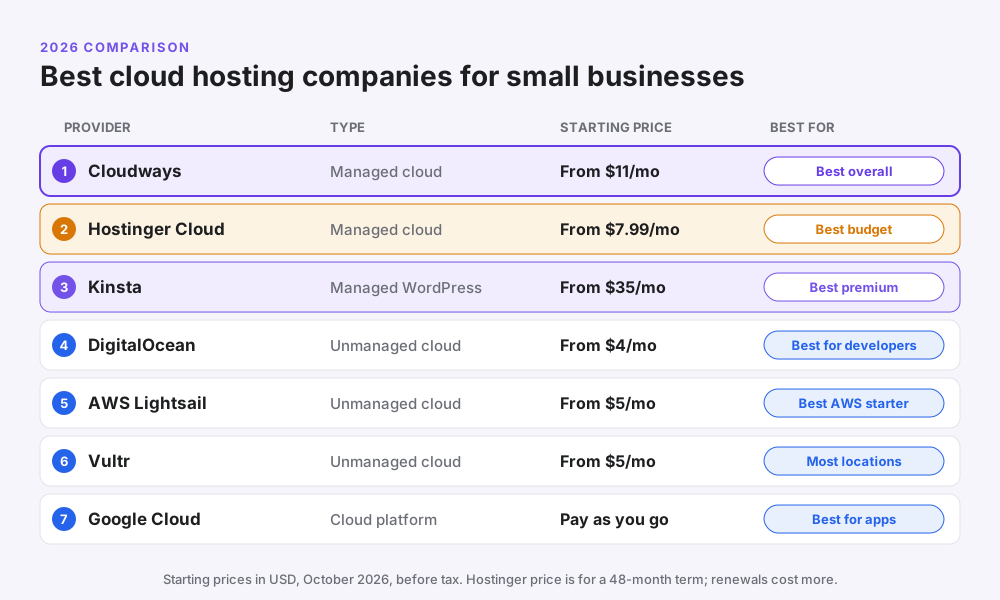
| Company | Type | Starting price | Billing | Best for |
|---|---|---|---|---|
| Cloudways | Managed cloud | $11/month | Monthly, pay as you go | Most small businesses and agencies |
| Hostinger Cloud | Managed cloud | $7.99/month (48 months) | Upfront for the term | Tight budgets |
| Kinsta | Managed WordPress | $35/month ($30 on annual) | Monthly or yearly | Busy WordPress sites |
| DigitalOcean | Unmanaged cloud | $4/month | Hourly, capped monthly | Developers |
| AWS Lightsail | Unmanaged cloud | $5/month | Monthly | Starting on AWS |
| Vultr | Unmanaged cloud | $5/month | Hourly, capped monthly | Global reach |
| Google Cloud | Cloud platform | Pay as you go | Usage based | Custom apps |
Managed means the company sets up, secures and maintains the server for you. Unmanaged means you get a raw server and do that work yourself.
1. Cloudways: best cloud hosting overall for small businesses
Cloudways is a managed cloud hosting platform. You choose the infrastructure (DigitalOcean, Vultr, Linode, AWS or Google Cloud), and Cloudways handles server setup, security patches, caching and backups.
That combination is why it suits small businesses so well. You get the speed and flexibility of the big cloud providers without needing to know how to run a Linux server.
| Detail | Cloudways |
|---|---|
| Starting price | About $11/month (DigitalOcean 1 GB) |
| Billing | Monthly, pay as you go, no long contract |
| Free trial | 3 days, no credit card required |
| Cloud providers | DigitalOcean, Vultr, Linode, AWS, Google Cloud |
| Apps | WordPress, WooCommerce, Magento, Laravel, PHP |
| Support | 24/7 live chat and tickets |
| Paid add-on |
| Pros | Cons |
|---|---|
| Managed servers on top-tier clouds | No email included by default |
| Monthly billing with no lock-in | No domain registration |
| Scale up or down in a few clicks | Dashboard has a learning curve at first |
| Staging, cloning and team access built in | AWS and Google Cloud plans cost much more |
| Strong for agencies with many sites |
Best for: business websites, WooCommerce stores, agencies and anyone outgrowing shared hosting. Not ideal for: a tiny personal blog where $3 shared hosting is enough.
Pro tip: start on the DigitalOcean 1 GB or 2 GB server and pick the data centre nearest your customers. You can resize later without moving your site. Read our full Cloudways review and check the Cloudways promo code page for current deals.
2. Hostinger Cloud: best budget cloud hosting
Hostinger Cloud gives you cloud hosting inside Hostinger’s easy hPanel dashboard. It feels like shared hosting to use, but your site gets its own guaranteed resources.
It is the cheapest managed cloud option in this list. The catch is the long term: the lowest price needs a 48-month plan paid upfront, and it renews at a much higher rate.
| Detail | Hostinger Cloud Startup |
|---|---|
| Starting price | $7.99/month on a 48-month term (₹599 in India) |
| Renewal | $25.99/month (₹1,599 in India) |
| Storage | 100 GB NVMe |
| Included | Free domain for 1 year, free SSL, CDN, daily backups, dedicated IP |
| Business email included | |
| Support | 24/7 live chat |
| Guarantee | 30-day money-back guarantee |
| Pros | Cons |
|---|---|
| Lowest managed cloud price | Lowest price needs a 4-year upfront payment |
| Beginner-friendly hPanel | Renewal price is about three times higher |
| Email and a free domain included | Less control than a true cloud server |
| Data centres in India, the US, Europe and more | Fewer developer tools than Cloudways |
Best for: small business sites and stores on a budget that want one bill for hosting, domain and email. Not ideal for: agencies that want monthly billing per client.
Want more detail? Read our Hostinger India review or see how it compares in Hostinger vs Namecheap.
3. Kinsta: best premium managed WordPress cloud hosting
Kinsta is a premium managed WordPress host that runs every site on Google Cloud. It is known for its clean dashboard, fast performance and expert support.
Plans are priced by monthly visits rather than server size. That makes costs predictable, but it gets expensive as traffic grows.
| Detail | Kinsta Single 35k |
|---|---|
| Starting price | $35/month, or $30/month billed yearly |
| Visits | 35,000 per month |
| Infrastructure | Google Cloud |
| Support | 24/7 expert support |
| Guarantee | 30-day money-back guarantee |
| Pros | Cons |
|---|---|
| Excellent speed and dashboard | Three times the price of Cloudways |
| Built-in CDN, backups and staging | WordPress only |
| Great WordPress support | Visit limits with overage charges |
| No server decisions to make | No email hosting |
Best for: established WordPress businesses that value support over price. See our Kinsta review for a full breakdown.
4. DigitalOcean: best cloud hosting for developers
DigitalOcean is popular with developers because it is simple, well documented and fairly priced. Its virtual servers, called Droplets, start at $4 a month.
There is no control panel for WordPress, no managed security and no website support. You install and maintain everything yourself, or you use a managed layer such as Cloudways on DigitalOcean.
| Detail | DigitalOcean |
|---|---|
| Starting price | $4/month (512 MB RAM, 10 GB SSD) |
| Billing | Hourly, capped at the monthly price |
| Extras | Managed databases, App Platform, Spaces storage |
| Locations | Data centres in North America, Europe and Asia, including Bangalore |
| Pros | Cons |
|---|---|
| Low, predictable pricing | Unmanaged: you handle security and updates |
| Simple dashboard and great tutorials | The $4 plan is too small for most business sites |
| Fast to launch servers | Support covers the platform, not your website |
Best for: developers and tech-savvy owners. Not ideal for: owners who just want a working website.
5. AWS Lightsail: easiest way to start on AWS
Amazon Lightsail is AWS’s simplified, fixed-price version of its cloud. It bundles a server, storage and data transfer into one monthly price, which avoids the famously complex AWS bill.
| Detail | AWS Lightsail |
|---|---|
| Starting price | $5/month with a public IPv4 address (512 MB RAM) |
| IPv6-only plan | $3.50/month |
| Free trial | 3 months free on selected plans for new Lightsail users |
| WordPress | One-click WordPress image |
| Pros | Cons |
|---|---|
| Backed by Amazon’s global network | Still unmanaged |
| Fixed monthly price | Small plans struggle with busy sites |
| Easy path to other AWS services | AWS support costs extra |
Best for: small teams that expect to use AWS later. If you want AWS without the server work, Cloudways also offers AWS servers.
6. Vultr: best for global locations
Vultr offers cloud servers in 33 data centre regions, including three in India (Mumbai, Delhi NCR and Bangalore). That makes it a strong choice when your customers are spread across countries.
| Detail | Vultr |
|---|---|
| Starting price | $5/month (Cloud Compute) |
| Locations | 33 regions worldwide |
| India regions | Mumbai, Delhi NCR, Bangalore |
| Billing | Hourly, capped monthly |
| Pros | Cons |
|---|---|
| Many locations close to customers | Unmanaged |
| Competitive prices | Fewer beginner tutorials than DigitalOcean |
| High-performance NVMe options | No website-level support |
Best for: developers serving customers in several regions. Vultr servers are also available inside Cloudways if you prefer a managed setup.
7. Google Cloud: best for custom apps that need to scale
Google Cloud is a full cloud platform used by large companies. It offers virtual machines, databases, AI tools and serverless hosting, billed by usage.
New customers get $300 in free credit to try it, and a small e2-micro virtual machine is free within usage limits in selected US regions. For a normal business website, though, it is more complex than you need.
| Pros | Cons |
|---|---|
| Huge range of services | Complex pricing and setup |
| Google’s fast global network | Easy to run up unexpected bills |
| Generous credit for new users | Best handled by a developer |
Best for: startups building custom software. For a WordPress site on Google’s infrastructure without the complexity, use Kinsta or Cloudways on Google Cloud.
Cloud hosting prices and real yearly cost
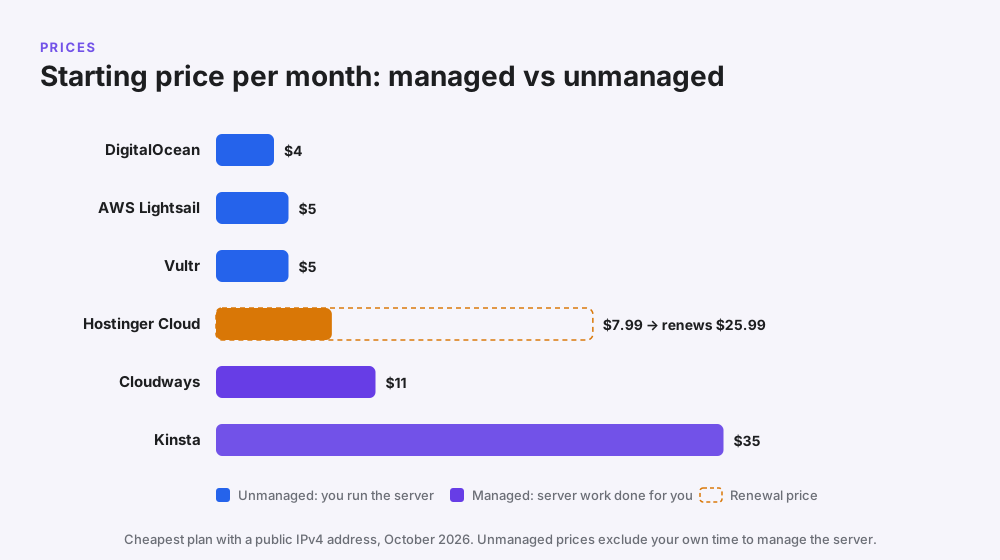
The headline price only tells part of the story. Here is what the cheapest plan of each provider costs over the first year:
| Provider | Cheapest plan | First-year cost | What it doesn’t include |
|---|---|---|---|
| DigitalOcean | $4/month | About $48 | Your time to set up, secure and update the server |
| AWS Lightsail | $5/month (3 months free) | About $45 | Server management, AWS support plan |
| Vultr | $5/month | About $60 | Server management |
| Hostinger Cloud | $7.99/month for 48 months | About $96 (paid as $383.52 upfront) | Renews at $25.99/month |
| Cloudways | $11/month | About $132 | Email (add-on), domain |
| Kinsta | $30/month billed yearly | About $360 | Email, domain |
Why the cheapest isn’t always cheapest: an unmanaged $4 server can need several hours a month of updates and fixes. If your time or a developer’s time is worth $20 an hour, managed hosting usually works out cheaper.
Managed vs unmanaged cloud hosting
| Managed (Cloudways, Hostinger Cloud, Kinsta) | Unmanaged (DigitalOcean, Lightsail, Vultr, Google Cloud) | |
|---|---|---|
| Server setup | Done for you | You do it |
| Security patches | Handled for you | Your job |
| Backups | Built in | You configure them |
| Support | Helps with server and site issues | Platform issues only |
| Price | Higher | Lower, plus your time |
| Best for | Business owners and agencies | Developers |
If you are still deciding whether you need cloud hosting at all, read our guide to cloud hosting advantages and disadvantages.
How to choose the best cloud hosting for your business
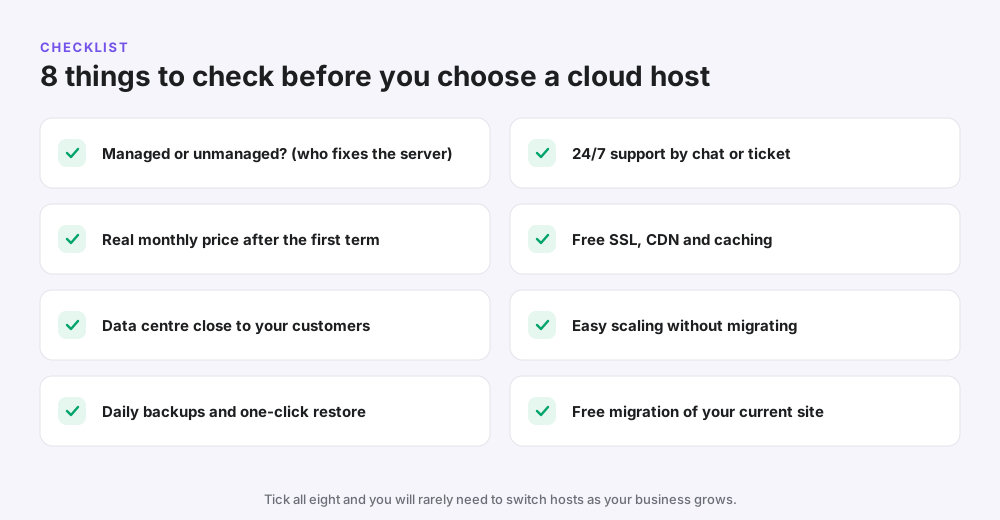
- Decide who will manage the server. No developer? Choose managed cloud hosting.
- Check the renewal price, not just the first-term discount.
- Pick a data centre near your customers, for example Mumbai or Bangalore for India and New York for the US East Coast.
- Confirm daily backups and one-click restore.
- Test support with a pre-sales chat question.
- Look for free SSL, CDN and caching so pages load fast.
- Make sure you can scale without migrating to a new host.
- Ask about free migration of your current site.
Common mistake: choosing on price alone. A slow or broken checkout costs far more than the few dollars a month you save.
Best cloud hosting pick by business type
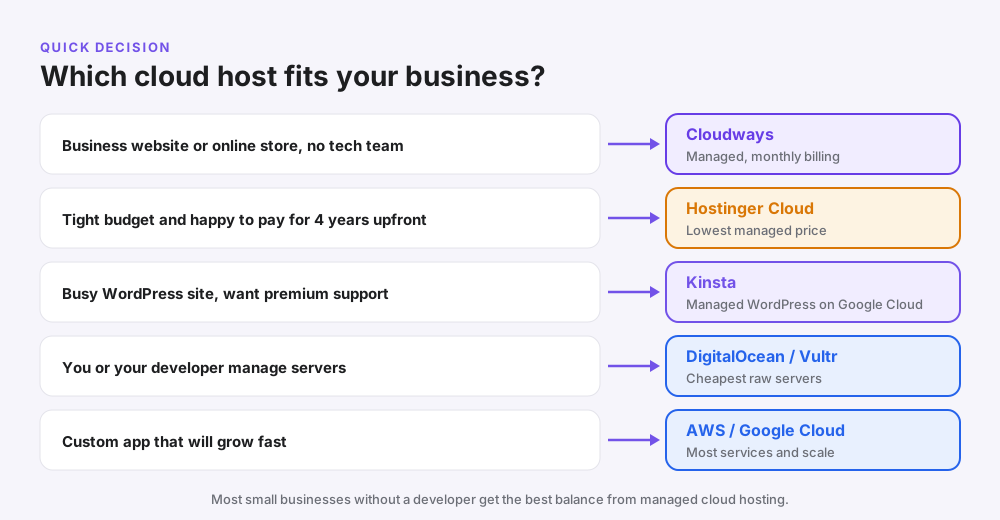
| Your business | Best pick | Why |
|---|---|---|
| Local service business (clinic, salon, consultant) | Cloudways or Hostinger Cloud | Fast, reliable site with little maintenance |
| WooCommerce or D2C store | Cloudways | Scales for sales and festival traffic |
| Digital or marketing agency | Cloudways | Many client sites, team access, monthly billing |
| Budget startup website | Hostinger Cloud | Lowest managed price, email included |
| High-traffic WordPress publisher | Kinsta or Cloudways | Premium performance and support |
| SaaS or custom app | DigitalOcean, AWS or Google Cloud | Full control and developer tools |
Running ads to your site? Cloud hosting helps your landing pages stay fast when Facebook ads send a burst of visitors.
Mini case studies
These are illustrative scenarios based on common situations, not specific clients.
A Delhi clothing store before Diwali
Problem: the store’s shared hosting slowed down every sale weekend. Solution: it moved to a Cloudways server in Mumbai and doubled the server size for the festival week. Result: checkout stayed fast, and the owner scaled back down in November to keep costs low.
A US accountant on a budget
Problem: the firm wanted a reliable site with business email for under $10 a month. Solution: Hostinger Cloud on a 48-month plan, with email included. Result: one low bill, and no server work for a non-technical owner.
A five-person agency
Problem: 20 client sites spread across cheap hosts with no staging. Solution: three Cloudways servers, with each client billed monthly. Result: safer updates and one dashboard for everything.
How to get started with cloud hosting (Cloudways example)
- Sign up for the Cloudways free trial. No credit card is needed.
- Choose your app (for example WordPress or WooCommerce).
- Pick DigitalOcean and a 1 GB or 2 GB server.
- Choose the data centre closest to your customers.
- Launch the server, which takes a few minutes.
- Migrate your site with the Cloudways migration plugin, then test it on the temporary URL.
- Point your domain to the new server and turn on backups.
Pro tip: keep your old hosting active for a week after switching, in case you need anything from it.
Common mistakes when choosing a cloud host
- Buying unmanaged cloud without the skills to secure it.
- Ignoring the renewal price on long-term discount plans.
- Choosing a far-away data centre from your customers.
- Forgetting email, which many cloud hosts don’t include.
- Overbuying a large server “just in case” instead of scaling later.
- Skipping backups because the host “handles it”.
Pro tips to get more from your cloud hosting
- Put Cloudflare in front of your site for extra speed and protection.
- Turn on server caching and a WordPress cache plugin.
- Compress images to WebP and keep them under 150 KB.
- Use staging for plugin and theme updates.
- Review server usage monthly and resize to fit.
- Check your speed with Google PageSpeed Insights after every big change.
Frequently asked questions
What is the best cloud hosting company for small businesses?
For most small businesses, Cloudways is the best choice. It offers managed cloud servers on DigitalOcean, AWS, Google Cloud and others from about $11 a month, with monthly billing and 24/7 support.
What is the cheapest cloud hosting for a small business?
DigitalOcean starts at $4 a month and AWS Lightsail and Vultr at $5, but they are unmanaged. The cheapest managed option is Hostinger Cloud at $7.99 a month on a 48-month term.
Is cloud hosting good for small businesses?
Yes, once your website matters to sales. Cloud hosting is faster and more reliable than shared hosting and can scale during busy periods.
Which cloud hosting is best for WordPress?
Cloudways is the best value managed cloud for WordPress, while Kinsta is the premium choice. Hostinger Cloud is the budget pick.
How much does cloud hosting cost per month?
Managed cloud hosting for a small business usually costs $8–$35 a month. Unmanaged servers start at $4–$5 a month but need technical skills.
Is Cloudways better than Hostinger Cloud?
Cloudways is better for flexibility, monthly billing and agencies. Hostinger Cloud is cheaper upfront and includes email and a domain, but needs a long term for the lowest price.
Is AWS good for small businesses?
AWS is powerful but complex. AWS Lightsail is the easiest way for a small business to start on AWS, or you can use AWS servers through Cloudways.
Do cloud hosting companies offer free trials?
Some do. Cloudways offers a 3-day free trial without a credit card, AWS Lightsail offers 3 months free on selected plans, and Google Cloud gives new customers $300 in credit.
Does cloud hosting include email?
Not always. Hostinger Cloud includes email, while Cloudways sells it as an add-on and Kinsta doesn’t offer it. Many businesses use Google Workspace or Zoho Mail.
What is the difference between managed and unmanaged cloud hosting?
With managed hosting, the provider sets up, secures and maintains the server. With unmanaged hosting, you get a raw server and handle all of that yourself.
Which cloud hosting has data centres in India?
Cloudways (through DigitalOcean, AWS, Google Cloud and Vultr), Hostinger, DigitalOcean (Bangalore), Vultr (Mumbai, Delhi NCR, Bangalore), AWS and Google Cloud all offer Indian locations.
Can I move my website to cloud hosting myself?
Yes. Most managed cloud hosts provide a migration plugin or a free migration service. You test the site on a temporary URL before pointing your domain.
Is cloud hosting better than shared hosting for a small business?
Cloud hosting is faster and more reliable, but costs more. Shared hosting is fine for a new site; cloud hosting is better once you have regular traffic or sales.
Is Kinsta worth it for a small business?
Kinsta is worth it if you run a busy WordPress site and value premium support. For most small businesses, Cloudways gives similar performance for less.
Which cloud hosting is best for an online store?
Cloudways is the best choice for most WooCommerce and online stores because it scales easily for sales and offers servers close to your customers.
Related reading
- Cloud hosting advantages and disadvantages
- Cloudways review 2026
- Cloudways promo code
- Kinsta review
- Hostinger India review
- Best web hosting for beginners
Conclusion: the best cloud hosting company for your small business
The best cloud hosting company for most small businesses is Cloudways: managed servers on top-tier clouds, monthly billing and room to grow. If budget comes first, Hostinger Cloud is the cheapest managed option, and Kinsta is the premium choice for busy WordPress sites.
Choose unmanaged providers such as DigitalOcean, AWS Lightsail, Vultr or Google Cloud only if you or a developer will look after the server.
Need more customers once your site is fast? GetToMarketing is a Meta Ads agency that helps small businesses turn traffic into sales.