
Disclosure: this guide contains affiliate links to Cloudways and Hostinger. If you buy through them, we may earn a commission at no extra cost to you. We explain the downsides of cloud hosting too.
Quick answer
Cloud hosting runs your website on a pool of connected servers instead of one machine. Its main advantages are easy scaling, better uptime, faster performance and pay-as-you-go pricing. Its main disadvantages are a higher cost than shared hosting, more technical setup on unmanaged plans, and bills that can change with usage.
For most growing businesses, managed cloud hosting gives the advantages without the hard parts. Cloudways starts at about $11 a month with a free trial, while a new blog under about 25,000 visits a month is usually fine on cheaper shared hosting.
Cloud hosting at a glance (2026)
- What it is
- Your site runs on a network of servers
- Biggest advantages
- Scaling, uptime, speed, pay-as-you-go
- Biggest disadvantages
- Cost, complexity, variable bills
- Typical price
- From about $8–$11/month (managed)
- Best for
- Online stores, busy sites, agencies, apps
- Not ideal for
- Tiny sites on a very tight budget
- Easy way to start
- Managed cloud such as Cloudways
In this guide:
- Quick answer
- What is cloud hosting?
- How cloud hosting works
- 10 advantages of cloud hosting
- 8 disadvantages of cloud hosting
- Cloud vs shared vs VPS hosting
- Real examples of cloud hosting
- Mini case studies
- How much does cloud hosting cost?
- When to use it (and when not to)
- Managed vs unmanaged cloud hosting
- How to move to cloud hosting
- Common mistakes
- Pro tips
- FAQs
Your website was fine for months. Then a sale, a viral post or a festival rush hit, and the site slowed to a crawl or went down just when customers arrived.
That is usually the moment people start looking at cloud hosting. But cloud hosting isn’t automatically better: it costs more, it can be more technical, and some sites simply don’t need it.
This guide explains the real cloud hosting advantages and disadvantages, with plain-English examples, a cost comparison and a simple way to decide whether it’s right for your website.
What is cloud hosting?
Cloud hosting is a way of hosting a website on virtual servers that draw resources from a large network of physical servers. Instead of renting space on one computer, your site uses computing power, memory and storage from a pool that can grow or shrink when needed.
The “cloud” is simply servers in data centres run by companies such as Amazon Web Services (AWS), Google Cloud, Microsoft Azure, DigitalOcean and Vultr. You can rent them directly, or use a managed platform that sets everything up for you.
| Term | Plain meaning |
|---|---|
| Cloud server | A virtual server running on shared physical hardware |
| Scaling | Adding or removing CPU, RAM or storage |
| Managed cloud | A company sets up, secures and maintains the server for you |
| Unmanaged cloud | You get a raw server and manage everything yourself |
| Pay-as-you-go | You pay by the hour or month for what you use |
How cloud hosting works
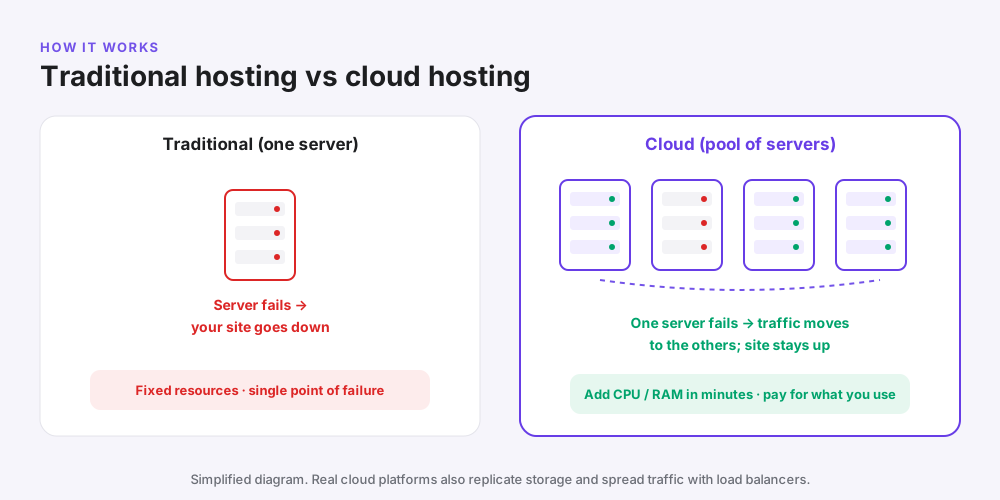
With traditional hosting, your site lives on one physical server. If that server has a hardware fault or gets overloaded, your site slows down or goes offline.
With cloud hosting, your site runs on a virtual machine. The provider can move it to healthy hardware, restore it from snapshots and give it more resources when traffic rises.
- A visitor types your address and their browser contacts your cloud server.
- The server builds the page, often from a cache so it is fast.
- Files and images are delivered, usually through a CDN close to the visitor.
- If traffic grows, you (or your provider) add CPU and RAM, often in minutes.
Why it matters: your website is no longer limited by the size or health of a single machine.
10 advantages of cloud hosting
1. Easy scalability
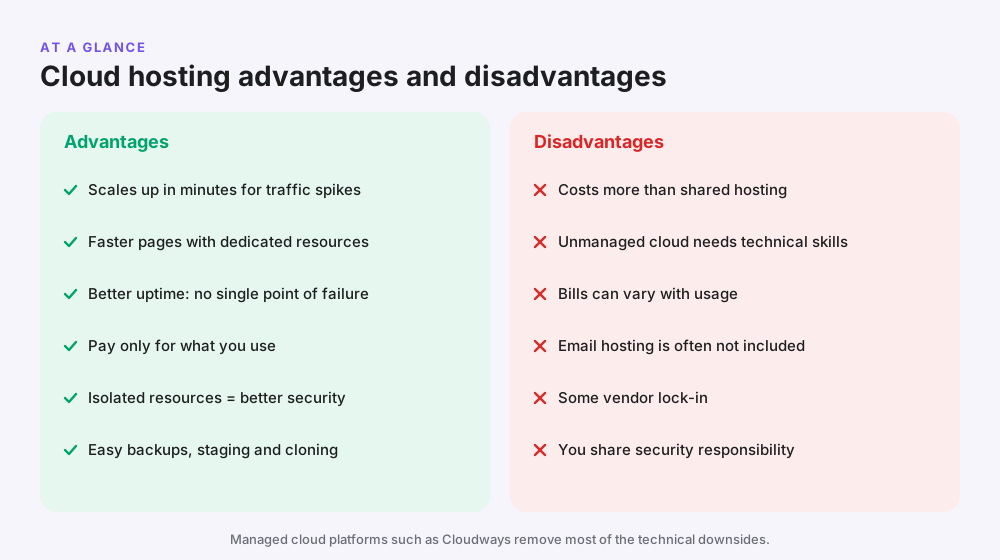
You can add CPU, RAM and storage when you need them and scale back later. On managed platforms such as Cloudways, resizing a server takes a few clicks.
Example: an online store doubles its server size for a Diwali or Black Friday sale, then scales down in December.
2. Better performance
Cloud servers give you dedicated resources rather than sharing them with hundreds of other sites. Combined with caching and SSD or NVMe storage, pages usually load faster and stay fast under load.
3. Higher uptime and reliability
Because the infrastructure is spread across many machines, one hardware failure doesn’t have to take your site down. Many providers offer uptime guarantees of 99.9% or more.
4. Pay-as-you-go pricing
Many cloud platforms bill by the hour or month with no long contract. You pay for the size of server you choose, not a four-year upfront bill.
5. Handles traffic spikes
A sudden rush of visitors from a sale, an ad campaign or a viral post is exactly what cloud hosting is built for. This matters if you run Facebook ads that can send hundreds of visitors at once.
6. Stronger isolation and security
Your server isn’t shared with other people’s websites, so one infected neighbour can’t slow down or compromise your site. Managed providers add firewalls, free SSL and security patches.
7. Simple backups and disaster recovery
Cloud platforms make it easy to take snapshots and automatic backups and restore them quickly. If an update breaks your site, you can roll back in minutes.
8. Choice of data centre locations
You can host close to your customers, for example in Mumbai for India, New York for the US East Coast or London for the UK. A nearby server means faster loading.
9. Developer and agency tools
Staging sites, one-click cloning, SSH and Git access make it easy to test changes safely. Agencies can manage many client sites from one dashboard and give clients separate access.
10. Room to grow without moving host
You can start small and grow on the same platform. That avoids a risky migration every time your site outgrows its plan.
8 disadvantages of cloud hosting
1. It costs more than shared hosting
Entry-level managed cloud costs around $8–$11 a month, compared with about $3 a month for shared hosting on a long term. For a tiny site, that extra cost may not be worth it.
2. Unmanaged cloud needs technical skills
A raw server from AWS or DigitalOcean expects you to install the web server, database, security updates and backups yourself. Mistakes can leave your site slow or insecure.
The fix: use a managed platform such as Cloudways that handles server setup and maintenance for you.
3. Bills can vary
With pay-as-you-go pricing, extra bandwidth, storage or backups can increase your bill. Unexpected traffic can mean an unexpected invoice.
4. Email is often not included
Many cloud platforms don’t include email hosting. Cloudways, for example, offers email as a paid add-on, so many owners use Google Workspace or Zoho Mail instead.
5. Some vendor lock-in
Each provider has its own tools and dashboards. Moving between big clouds such as AWS and Google Cloud can take real effort.
6. Shared security responsibility
The provider secures the hardware, but you are still responsible for your website: strong passwords, plugin updates and user access.
7. More choices can be confusing
Server sizes, regions, providers and add-ons give you flexibility but can overwhelm beginners. That is why most small businesses are better off with a managed plan.
8. It depends on your provider’s network
Even big cloud providers have occasional regional outages. Good backups and a provider with several data centres reduce the risk.
| Advantage | Disadvantage it trades against |
|---|---|
| Scales on demand | Bills can vary with usage |
| Dedicated resources | Higher monthly price than shared |
| Full control (unmanaged) | Needs technical skills |
| Many providers and regions | More choices to understand |
| Pay monthly, no contract | No big multi-year discount |
Cloud hosting vs shared hosting vs VPS
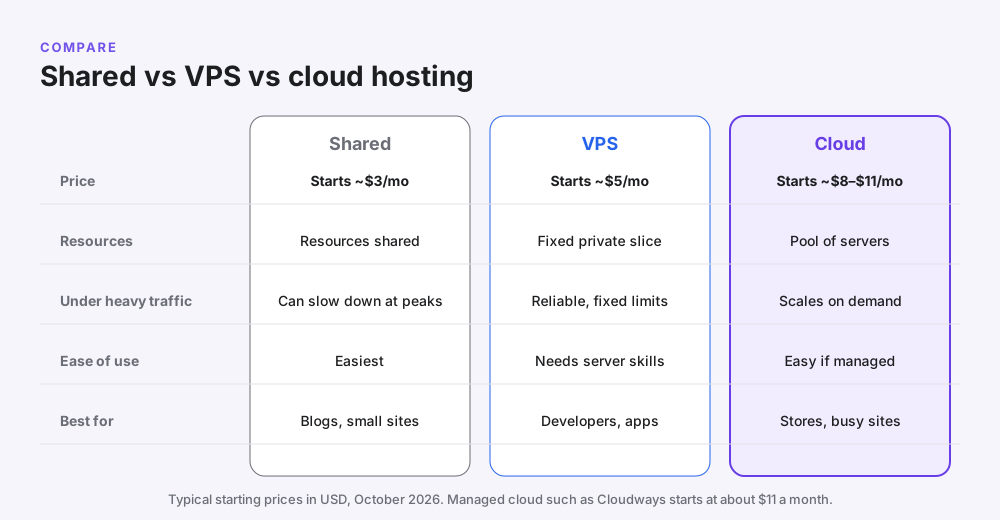
| Feature | Shared hosting | VPS | Cloud hosting |
|---|---|---|---|
| How it works | Many sites share one server | A fixed slice of one server | Virtual server on a pool of hardware |
| Starting price | About $3/month (long term) | About $5/month | About $8–$11/month managed |
| Performance at peaks | Can slow down | Reliable but fixed | Scales up |
| Ease of use | Easiest | Technical | Easy if managed |
| Best for | New blogs and small sites | Developers | Stores, busy sites, agencies |
Rule of thumb: start on shared hosting such as Hostinger, and move to cloud hosting when traffic, sales or slow pages start costing you money. Our WordPress hosting vs web hosting guide explains the other hosting types in more detail.
Real examples of cloud hosting
Cloud hosting powers everything from global streaming services to small online shops.
| Example | Platform | Why it uses the cloud |
|---|---|---|
| Netflix | Amazon Web Services | Streams to millions of viewers worldwide and scales with demand |
| Spotify | Google Cloud | Moved its infrastructure to the cloud to scale and innovate faster |
| WordPress agencies | Managed cloud such as Cloudways | Host many client sites with staging and cloning |
| D2C online stores | Managed cloud or cloud hosting plans | Handle sale-day traffic spikes |
| SaaS and web apps | AWS, Google Cloud, DigitalOcean | Run custom code and databases that grow with users |
The same technology big companies use is now available to small businesses for the price of a lunch each month, thanks to managed platforms.
Mini case studies
These are illustrative scenarios based on common situations, not specific clients.
An Indian D2C store during a festival sale
Problem: a clothing brand on shared hosting slows down during its Diwali sale, and checkout errors appear when traffic peaks. Solution: it moves to a managed cloud server in Mumbai and scales up the server for the sale week. Result: pages stay fast, and the owner scales back down after the festival to control costs.
A US food blog that goes viral
Problem: a recipe goes viral on Pinterest and traffic jumps ten times in a day. Solution: on a cloud server with caching and a CDN, the blogger upgrades the server size in a few clicks. Result: the site stays online and keeps earning ad revenue during the spike.
A digital agency with 25 client sites
Problem: client sites are spread across different cheap hosts, and updates are slow and risky. Solution: the agency moves them to a few managed cloud servers with staging for every site. Result: one dashboard, safer updates and easy client billing.
When cloud hosting was the wrong choice
A local bakery with a five-page website and 1,500 visits a month moved to cloud hosting and paid four times more for no visible benefit. Shared hosting such as Hostinger Premium would have been plenty.
How much does cloud hosting cost?
| Option | Typical starting price | What you get |
|---|---|---|
| Hostinger Cloud Startup | $7.99/month (₹599 in India) on a 48-month term | Cloud plan in a simple dashboard; renews at $25.99/month |
| Cloudways (managed cloud) | From about $11/month, billed monthly | Choice of DigitalOcean, Vultr, Linode, AWS or Google Cloud, managed for you |
| DigitalOcean / Vultr (unmanaged) | About $5–$6/month | A raw server; you manage everything |
| AWS / Google Cloud (unmanaged) | Varies by usage | Maximum flexibility; most complex billing |
| Shared hosting (for comparison) | About $3/month on a long term | Easiest, but limited resources |
Pro tip: compare the monthly cost with what a slow or offline site costs you. If one lost sale a month is worth more than $10, managed cloud hosting usually pays for itself.
For detailed prices and features, read our Cloudways review. To save on your first months, check our Cloudways promo code page.
When to use cloud hosting (and when not to)
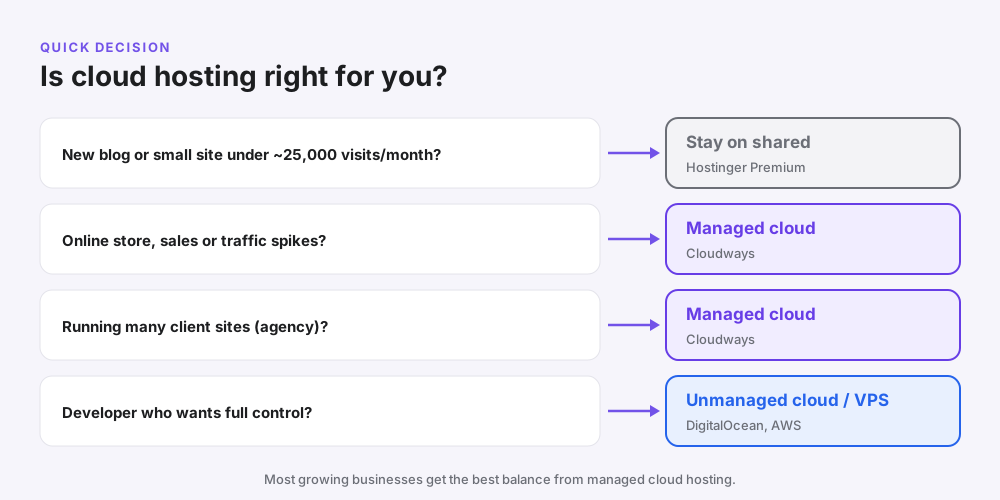
Choose cloud hosting if…
- You run an online store or take bookings and payments.
- Your traffic has spikes from sales, ads or seasonal demand.
- Your site regularly gets more than about 25,000 visits a month.
- You manage several websites for clients.
- Pages are slow on shared hosting even after caching and image optimisation.
Stay on shared hosting if…
- You are starting your first blog or portfolio.
- Your site has a few pages and steady, low traffic.
- Your budget is under about $5 a month.
- You don’t want to think about servers at all.
Starting out? See our guide to the best web hosting for beginners or our Hostinger India review.
Managed vs unmanaged cloud hosting
| Managed cloud | Unmanaged cloud | |
|---|---|---|
| Example | Cloudways, Hostinger Cloud | DigitalOcean, AWS, Google Cloud directly |
| Server setup | Done for you | You do it |
| Security updates | Handled by the provider | Your job |
| Backups | Built in or one click | You set them up |
| Support | 24/7 help with the server | Mostly self-service |
| Price | A little higher | Lower, but your time costs more |
| Best for | Businesses, agencies, non-developers | Developers and DevOps teams |
Our take: for almost every small business, managed cloud is the right choice. Cloudways lets you pick DigitalOcean, Vultr, Linode, AWS or Google Cloud underneath, while it handles the server work.
How to move to cloud hosting (step by step)
- Measure your needs. Check monthly visitors and current page speed with Google PageSpeed Insights.
- Choose a managed platform such as Cloudways and start the free trial.
- Pick a provider and region close to your visitors, for example DigitalOcean in Bangalore or New York.
- Start with a small server (1–2 GB RAM for most WordPress sites).
- Migrate your site with the provider’s migration plugin or free migration service.
- Test on the temporary URL, then point your domain to the new server.
- Turn on backups and caching, and monitor speed for a week before scaling up.
Common mistake: starting on a big server “just in case”. Start small and scale up only when your monitoring shows you need it.
Common mistakes with cloud hosting
- Moving a tiny site to the cloud and paying more for no benefit.
- Choosing unmanaged cloud without the skills to secure and update it.
- Ignoring add-on costs such as offsite backups, email and bandwidth.
- Picking a far-away data centre from your customers.
- Never testing backups until the day you need one.
- Not setting usage alerts, so a traffic spike becomes a surprise bill.
Pro tips to get the most from cloud hosting
- Use a CDN such as Cloudflare to serve images and files faster worldwide.
- Turn on server-level caching and a WordPress caching plugin.
- Compress images to WebP and keep most under 150 KB.
- Use a staging site for updates, then push changes live.
- Schedule daily backups and keep at least one copy off the server.
- Review server usage monthly and resize up or down to fit.
Frequently asked questions
What are the main advantages of cloud hosting?
The main advantages are easy scaling, better uptime, faster performance from dedicated resources, pay-as-you-go pricing, stronger isolation, easy backups and a choice of data centre locations.
What are the disadvantages of cloud hosting?
Cloud hosting costs more than shared hosting, unmanaged plans need technical skills, bills can vary with usage, email is often not included, and moving between providers can take effort.
What is cloud hosting in simple words?
Cloud hosting means your website runs on virtual servers that use resources from a large network of physical servers, so it can grow and stay online even if one machine fails.
Is cloud hosting better than shared hosting?
Cloud hosting is faster, more reliable and more scalable than shared hosting, but it costs more. Shared hosting is fine for new blogs and small sites; cloud hosting is better for stores and busy sites.
Is cloud hosting better than VPS?
Cloud hosting is usually more flexible than a VPS because it can scale and recover from hardware failures more easily. A VPS can be cheaper but has fixed resources on one physical server.
How much does cloud hosting cost?
Managed cloud hosting typically starts at about $8–$11 a month. Unmanaged cloud servers start at about $5 a month, while large sites on AWS or Google Cloud can cost much more.
Who should use cloud hosting?
Cloud hosting suits online stores, websites with traffic spikes, sites with more than about 25,000 monthly visits, agencies managing many sites, and web apps.
Is cloud hosting secure?
Yes. Cloud hosting isolates your resources from other customers, and managed providers add firewalls, SSL and security patches. You still need strong passwords and up-to-date plugins.
What are examples of cloud hosting providers?
Examples include Amazon Web Services, Google Cloud, Microsoft Azure, DigitalOcean, Vultr and Linode. Managed platforms such as Cloudways run on top of several of these.
Is cloud hosting good for WordPress?
Yes. Cloud hosting is excellent for WordPress sites that need speed and room to grow, especially WooCommerce stores. Managed cloud platforms make WordPress setup easy.
What is managed cloud hosting?
Managed cloud hosting means a provider sets up, secures, updates and backs up your cloud server for you, so you get the benefits of the cloud without server administration.
Can I switch from shared hosting to cloud hosting?
Yes. Most managed cloud platforms offer migration plugins or free migration. You test the site on a temporary URL, then point your domain to the new server.
Does cloud hosting include email?
Often not. Many cloud platforms, including Cloudways, sell email as an add-on, so many businesses use Google Workspace or Zoho Mail for email.
Is cloud hosting good for small businesses?
Yes, once your website matters to sales. A small business with an online store, bookings or ad traffic usually benefits from managed cloud hosting.
Does cloud hosting improve SEO?
Indirectly, yes. Faster loading and better uptime help user experience and Core Web Vitals, which support SEO. Hosting alone won’t rank a page without good content.
Related reading
- Cloudways review 2026
- Cloudways promo code
- Kinsta review
- WordPress hosting vs web hosting
- Hostinger India review
- Best web hosting for beginners
Conclusion: are the advantages worth it?
The advantages of cloud hosting are real: scaling, speed, uptime and flexible pricing. The disadvantages are mostly cost and complexity, and a managed platform removes most of the complexity.
If your website makes money, has traffic spikes or is outgrowing shared hosting, cloud hosting is worth it. If you are just starting out, begin on shared hosting and move up when you need to.
Ready to try it? Start a free trial on Cloudways and see how your site performs on its own cloud server.
Need visitors as well as speed? GetToMarketing is a Meta Ads agency that helps small businesses turn traffic into customers.