
Disclosure: this guide contains affiliate links to Cloudways and Hostinger. If you buy through them, we may earn a commission at no extra cost to you. SiteGround, Kinsta, Nexcess and WordPress.com are not affiliate links.
Quick answer
The best WooCommerce hosting service for most stores in 2026 is Cloudways. It gives your shop its own managed cloud server with built-in caching from about $11 a month, billed monthly, so it stays fast during sales and you can scale up in a few clicks.
Launching on a tight budget? Hostinger Business costs $3.99 a month on a 48-month term and installs WooCommerce in one click. SiteGround is the friendliest choice for beginners, while Kinsta, Nexcess and WordPress.com suit busy stores with a bigger budget.
Best WooCommerce hosting at a glance (2026)
- Best overall
- Cloudways, from $11/month
- Best budget
- Hostinger Business, from $3.99/month
- Best for beginners
- SiteGround GrowBig, from $4.99/month
- Best premium
- Kinsta, from $35/month
- Best for growing stores
- Nexcess, from $15.83/month
- Easiest all-in-one
- WordPress.com Commerce, from $45/month
- Watch out for
- Renewal prices on long-term deals
In this guide:
- Quick answer
- What is WooCommerce hosting?
- What your store needs from a host
- How we chose
- Comparison table
- 1. Cloudways
- 2. Hostinger
- 3. SiteGround
- 4. Kinsta
- 5. Nexcess
- 6. WordPress.com
- Prices and renewals
- Shared vs managed vs cloud
- Which host fits your store
- Mini case studies
- How to launch a store on Cloudways
- Speed tips for WooCommerce
- Common mistakes
- FAQs
A slow store loses sales. Shoppers abandon carts when pages lag, and a checkout that crashes on a sale day can wipe out a month’s profit in an afternoon.
The problem is that most hosting reviews are written for blogs. An online store works the server much harder, and a plan that is fine for a blog can buckle when ten people check out at once.
This guide compares the best WooCommerce hosting services in 2026 from a store owner’s point of view. You get honest pros and cons, first-term and renewal prices, and a clear pick for every size of shop.
What is WooCommerce hosting?
WooCommerce hosting is web hosting set up to run an online store built with WooCommerce, the free ecommerce plugin for WordPress. It is WordPress hosting with extra power, caching and security for carts, checkouts and customer accounts.
Stores are harder to host than blogs. A blog page can be cached and served to thousands of visitors at once, but cart, checkout and “my account” pages are personal to each shopper, so the server has to build them fresh every time.
| Blog or brochure site | WooCommerce store | |
|---|---|---|
| Pages that can be cached | Almost all | Product pages only; cart and checkout can’t be |
| Database work | Light | Heavy: orders, stock, customers |
| Traffic pattern | Steady | Spikes during sales and ads |
| Cost of downtime | Lost readers | Lost orders and revenue |
| Security needs | Standard | Payments and customer data |
Why it matters: the right host keeps checkout fast when it counts. The wrong one makes your ad spend leak through abandoned carts.
What your WooCommerce store needs from a host
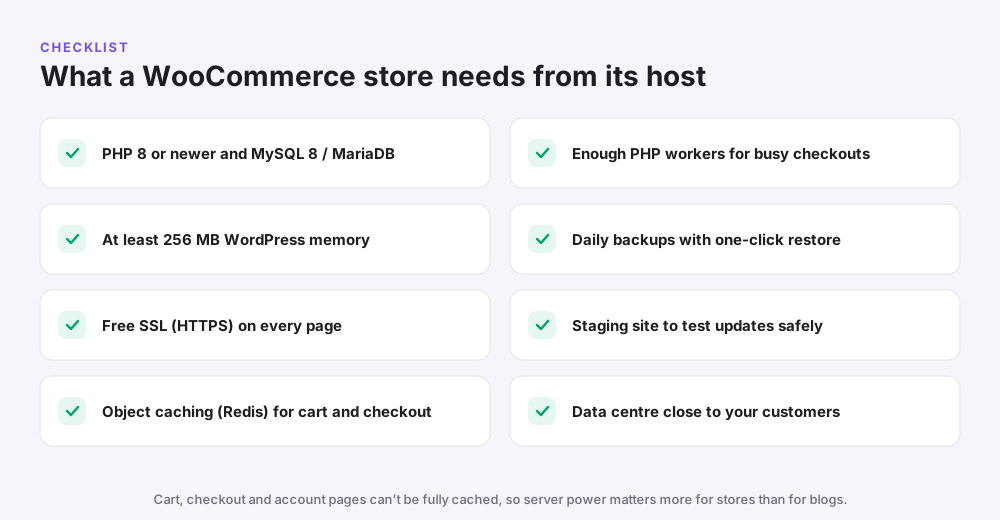
WooCommerce runs on most WordPress hosts, but these are the features that separate a smooth store from a slow one:
| Requirement | Why it matters |
|---|---|
| PHP 8 or newer, MySQL 8 or MariaDB | Faster code execution and better security |
| At least 256 MB WordPress memory | Prevents errors on busy product and order pages |
| Free SSL (HTTPS) | Required for payments and builds shopper trust |
| Object caching (Redis) | Speeds up carts and checkout that page caching can’t help |
| Enough PHP workers | Lets several shoppers check out at the same time |
| Daily backups | Orders change every day, so weekly backups aren’t enough |
| Staging site | Test plugin and theme updates before they break checkout |
| Nearby data centre | Lower latency for your main customers |
Common mistake: choosing the cheapest single-site plan for a store. It may launch fine, then slow down as soon as you get real orders.
How we chose the best WooCommerce hosting services
We looked at each host the way a small store owner would. Speed on cart and checkout pages mattered most, followed by the real price after any first-term discount.
- Store performance: server resources, object caching and PHP workers for busy checkouts.
- Real cost: the first-term price, the renewal price and add-ons such as email.
- Ease of use: one-click WooCommerce setup, staging and a clear dashboard.
- Reliability: daily backups, uptime and how easy it is to restore a broken store.
- Support: 24/7 help from people who understand WordPress and WooCommerce.
- Room to grow: scaling up for sales without moving to a new host.
Prices and features come from each host’s published plans and recent reviews, checked in November 2026.
Best WooCommerce hosting services compared
| Host | Type | Starting price | Renews at | Best for |
|---|---|---|---|---|
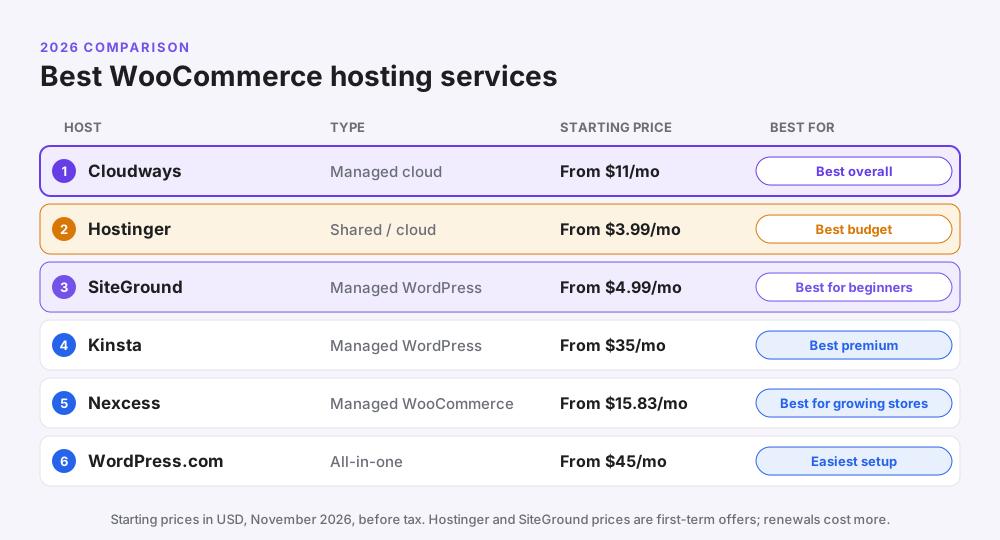
| Cloudways | Managed cloud | $11/month | $11/month (no jump) | Most stores, agencies |
| Hostinger | Shared and cloud | $3.99/month (48 months) | $16.99/month | New stores on a budget |
| SiteGround | Managed WordPress | $4.99/month (GrowBig) | $29.99/month | Beginners who want great support |
| Kinsta | Managed WordPress | $35/month ($30 on yearly) | Same | Premium managed hosting |
| Nexcess | Managed WooCommerce | From $15.83/month | Check at checkout | Growing stores |
| WordPress.com | All-in-one platform | $45/month on yearly (Commerce) | Same | No-maintenance stores |
Prices were checked in November 2026 and are shown in US dollars before tax. Promotional prices change often, so confirm the final price at checkout.
1. Cloudways: best WooCommerce hosting overall
Cloudways is a managed cloud platform that runs your store on its own server at DigitalOcean, Vultr, Linode, AWS or Google Cloud. Cloudways sets up the server, caching and security, so you get cloud power without needing a developer.
For WooCommerce, the big advantage is dedicated resources. Your checkout isn’t sharing a server with hundreds of other sites, and you can add RAM before a sale and scale down afterwards.
| Detail | Cloudways |
|---|---|
| Starting price | About $11/month (DigitalOcean 1 GB) |
| Billing | Monthly, pay as you go, no long contract |
| Free trial | 3 days, no credit card required |
| WooCommerce setup | One-click WooCommerce install |
| Caching | Server-level caching plus Redis object cache |
| Extras | Staging, cloning, team access, daily backups |
| Support | 24/7 live chat and tickets |
| Pros | Cons |
|---|---|
| Dedicated server resources for checkout | No email included (paid add-on) |
| No renewal price jump | No domain registration |
| Scale RAM up or down in minutes | Dashboard takes a day to learn |
| Choose a data centre near your customers, including India | Bigger servers cost more as you grow |
| Great for agencies running many stores |
Best for: growing stores, shops that run ads or sales, and agencies. Not ideal for: a test store with no orders yet, where cheaper shared hosting is enough.
Pro tip: start a WooCommerce store on a 2 GB server if you expect more than a few orders a day, then resize from there. Our Cloudways review covers plans in detail, and the Cloudways promo code page lists current deals.
2. Hostinger: best budget WooCommerce hosting
Hostinger is the cheapest reliable way to launch a WooCommerce store. Its Business plan installs WooCommerce in one click and runs on LiteSpeed servers with LiteSpeed Cache, which is strong for WordPress speed.
The low price needs a 48-month term paid upfront, and it renews at a higher rate. As the store grows, you can move up to Hostinger Cloud Startup without changing host.
| Detail | Hostinger Business |
|---|---|
| Starting price | $3.99/month on a 48-month term |
| Renewal | $16.99/month |
| India price | ₹249/month, renewing at ₹649 |
| Storage | 50 GB NVMe |
| Included | Free domain for 1 year, free SSL, CDN, daily backups, business email |
| Upgrade path | Cloud Startup at $7.99/month (renews $25.99) |
| Guarantee | 30-day money-back guarantee |
| Pros | Cons |
|---|---|
| Lowest price to launch a store | Best price needs 4 years upfront |
| One-click WooCommerce setup | Renewal is about four times higher |
| LiteSpeed caching built in | Shared resources on the Business plan |
| Email and a domain included | Not ideal for big sale-day spikes |
Best for: new stores and small catalogues. Read our Hostinger India review or the Hostinger coupon code page for the lowest current price.
3. SiteGround: best WooCommerce hosting for beginners
SiteGround is a managed WordPress host known for friendly support and easy tools. It can pre-install WooCommerce, and its Speed Optimizer plugin handles caching for you.
The catch is renewals. The GrowBig plan starts at $4.99 a month but renews at $29.99, so the second year costs much more.
| Plan | First-term price | Renewal |
|---|---|---|
| StartUp (1 site) | $2.99/month | $17.99/month |
| GrowBig (staging included) | $4.99/month | $29.99/month |
| GoGeek (more resources) | $7.99/month | $44.99/month |
| Pros | Cons |
|---|---|
| Excellent, fast support | Steep renewal prices |
| Easy WooCommerce setup | Storage limits are tight for big catalogues |
| Staging and daily backups on GrowBig and above | StartUp is too small for a real store |
| Runs on Google Cloud infrastructure |
Best for: first-time store owners who value support. Choose GrowBig or higher for WooCommerce.
4. Kinsta: best premium managed WooCommerce hosting
Kinsta is a premium managed WordPress host running on Google Cloud. Its caching is tuned to skip cart and checkout pages automatically, and its dashboard is one of the cleanest available.
| Detail | Kinsta Single 35k |
|---|---|
| Starting price | $35/month, or $30/month billed yearly |
| Visits | 35,000 a month |
| Included | CDN, staging, daily backups, free migrations |
| Guarantee | 30-day money-back guarantee |
| Pros | Cons |
|---|---|
| Fast and very reliable | About three times the price of Cloudways |
| WooCommerce-aware caching | Visit-based limits with overage charges |
| Expert 24/7 support | Redis is a paid add-on |
| No email hosting |
Best for: established stores that want premium service. See our Kinsta review.
5. Nexcess: best managed WooCommerce hosting for growing stores
Nexcess, part of Liquid Web, offers hosting built specifically for WooCommerce. Plans start from about $15.83 a month and include store-focused tools that general hosts don’t.
| Detail | Nexcess Managed WooCommerce |
|---|---|
| Starting price | From $15.83/month |
| Store tools | Sales performance monitoring and automatic checkout testing |
| Performance | Object Cache Pro, CDN, image compression, auto-scaling for traffic surges |
| Guarantee | 30-day money-back guarantee |
| Pros | Cons |
|---|---|
| Built only for WordPress and WooCommerce | Pricier than Cloudways at the start |
| Checkout testing catches broken stores | Dashboard is less beginner-friendly |
| Auto-scaling for traffic spikes | Fewer data centre choices |
Best for: stores with steady revenue that want WooCommerce-specific monitoring.
6. WordPress.com: easiest all-in-one WooCommerce platform
WordPress.com is run by Automattic, the company behind WooCommerce. Its Commerce plan comes with WooCommerce pre-installed, and hosting, security, updates and backups are handled for you.
| Plan | Yearly billing | Monthly billing |
|---|---|---|
| Business (add WooCommerce yourself) | $25/month | $40/month |
| Commerce (WooCommerce ready) | $45/month | $70/month |
| Pros | Cons |
|---|---|
| No server or update work at all | Expensive for a small store |
| WooCommerce built in on Commerce | Less control than your own server |
| Backed by the WooCommerce team | Monthly billing costs much more |
Best for: owners who want a store that “just works” and will pay for convenience.
WooCommerce hosting prices: first term vs renewal
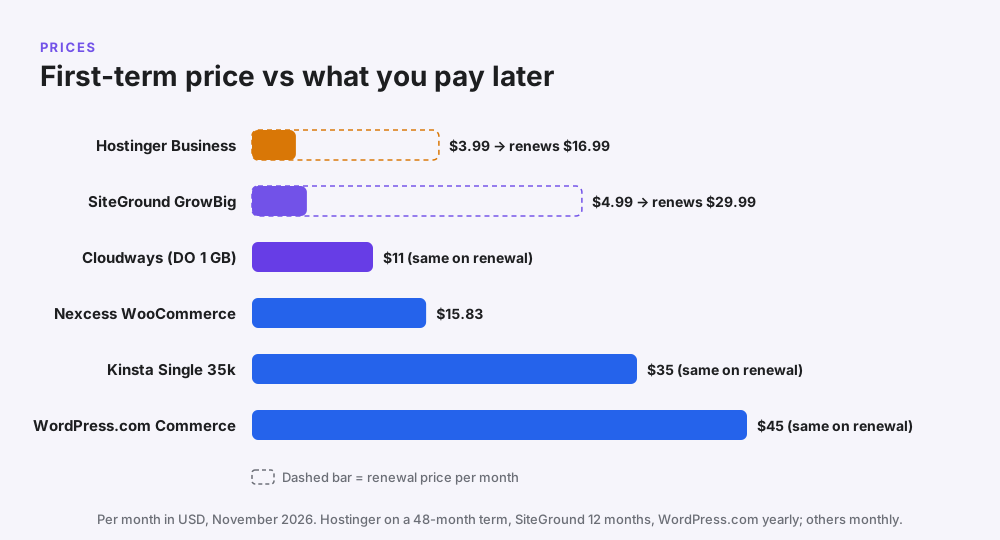
Many cheap WooCommerce hosting deals only last for the first term. Here is what you pay at the start and over three years:
| Host and plan | First payment | Price after first term | Approx. 3-year cost |
|---|---|---|---|
| Hostinger Business | $191.52 for 48 months | $16.99/month | $191.52 (term covers 4 years) |
| SiteGround GrowBig | $59.88 for 12 months | $29.99/month | About $780 |
| Cloudways DO 1 GB | $11 for the first month | $11/month | About $396 |
| Kinsta Single 35k | $360 for a year | Same | About $1,080 |
| WordPress.com Commerce | $540 for a year | Same | About $1,620 |
| Nexcess | From $15.83/month | Check at checkout | From about $570 |
What this shows: Hostinger is cheapest if you commit upfront, and Cloudways is the cheapest monthly option with no renewal surprise. SiteGround’s low entry price becomes expensive from year two.
Shared vs managed vs cloud hosting for WooCommerce
| Shared (Hostinger Business, SiteGround) | Managed cloud (Cloudways) | Premium managed (Kinsta, Nexcess, WordPress.com) | |
|---|---|---|---|
| Price | $3–$5/month first term | From $11/month | $16–$45/month |
| Resources | Shared with other sites | Your own server | Isolated and tuned |
| Sale-day spikes | Can slow down | Scale up in minutes | Handled for you |
| Technical work | Very little | Very little | None |
| Best for | New, small stores | Growing stores and agencies | Busy stores with budget |
Want the bigger picture? Read our guides to WordPress hosting vs web hosting and the best cloud hosting companies.
Which WooCommerce host fits your store?
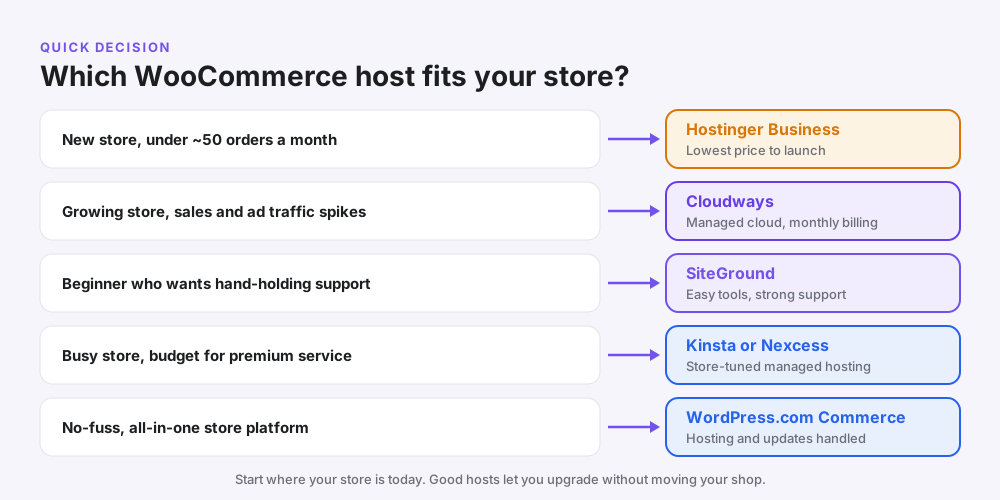
| Your store | Best pick | Why |
|---|---|---|
| Brand-new store, small catalogue | Hostinger Business | Lowest cost while you find your first customers |
| Growing D2C brand running ads | Cloudways | Handles traffic spikes from campaigns and sales |
| Agency building client stores | Cloudways | Many stores, team access, monthly billing per client |
| First-time owner who wants support | SiteGround GrowBig | Easy tools and patient support |
| Busy store, premium budget | Kinsta or Nexcess | Store-tuned caching and expert help |
| Owner who never wants to touch updates | WordPress.com Commerce | Everything handled for you |
Running Meta ads to your store? Fast pages lift conversion rates, so good hosting makes every rupee of ad spend work harder. Our guide to structuring your first ₹50,000 of Meta ad spend shows how to plan the traffic side.
Mini case studies
These are illustrative scenarios based on common situations, not specific clients.
A Jaipur jewellery store outgrows shared hosting
Problem: checkout slowed to 6–8 seconds during an Instagram sale. Solution: the store moved from shared hosting to a Cloudways 2 GB server in Mumbai with Redis turned on. Result: checkout loaded in under 2 seconds, and the owner scaled up only for sale weekends.
A US candle maker starts small
Problem: a new store with 30 products needed to launch for under $5 a month. Solution: Hostinger Business with WooCommerce installed in one click. Result: the store went live in a day, with a clear upgrade path to Hostinger Cloud later.
A UK supplements brand chooses premium
Problem: the team had no developer and couldn’t risk a broken checkout. Solution: managed WooCommerce hosting with automatic checkout testing. Result: problems were flagged before customers noticed them.
How to launch a WooCommerce store on Cloudways
- Sign up for the Cloudways free trial. No credit card is needed.
- Choose WooCommerce as your application.
- Pick DigitalOcean and a 2 GB server for a real store, or 1 GB for testing.
- Choose the data centre closest to your customers, such as Bangalore for India or New York for the US East Coast.
- Launch the server, which takes a few minutes.
- Turn on Redis from the server settings, then point your domain and install the free SSL.
- Add products, set up payments (Razorpay, Stripe or PayPal) and place a test order.
Already have a store? Use the Cloudways migration plugin, test on the temporary URL, then switch your domain. Our guide on how to create a WordPress website covers the WordPress basics.
Speed tips for any WooCommerce host
- Turn on object caching (Redis) for cart and checkout.
- Use a lightweight theme and avoid heavy page builders on product pages.
- Compress product images to WebP and keep them under 150 KB.
- Limit plugins to the ones you actually use.
- Disable cart fragments on pages that don’t need a live cart count.
- Clean old orders, sessions and transients from the database regularly.
- Test speed with Google PageSpeed Insights after every big change.
Common mistakes when choosing WooCommerce hosting
- Buying a single-site starter plan that has too little memory for a store.
- Ignoring renewal prices on long-term discount deals.
- Relying on weekly backups when orders change every day.
- Caching the cart and checkout, which breaks orders.
- Choosing a far-away data centre from your customers.
- Updating plugins on the live store without testing on staging first.
Frequently asked questions
What is the best WooCommerce hosting service?
For most stores, Cloudways is the best WooCommerce hosting service. It gives your store its own managed cloud server from about $11 a month with monthly billing and built-in caching.
What is the cheapest good WooCommerce hosting?
Hostinger Business is the cheapest reliable option at $3.99 a month on a 48-month term. It renews at $16.99 a month.
What is WooCommerce hosting?
WooCommerce hosting is WordPress hosting set up to run an online store with the WooCommerce plugin, with extra resources, caching and security for carts and checkout.
Do I need special hosting for WooCommerce?
You can run WooCommerce on any good WordPress host, but stores need more memory, object caching, daily backups and enough PHP workers than a normal blog.
How much does WooCommerce hosting cost?
Expect $4–$11 a month for a small store and $15–$45 a month for managed or premium WooCommerce hosting. Large stores can pay much more.
Is Hostinger good for WooCommerce?
Yes, for new and small stores. Hostinger Business installs WooCommerce in one click and uses LiteSpeed caching. Busy stores should move to Hostinger Cloud or a managed cloud host.
Is Cloudways good for WooCommerce?
Yes. Cloudways gives WooCommerce stores dedicated server resources, Redis caching, staging and easy scaling, which makes it a strong choice for growing shops.
Is SiteGround good for WooCommerce?
SiteGround is good for beginners because of its support and easy tools, but its renewal prices are high. Choose GrowBig or higher for a store.
Which is better for WooCommerce, Cloudways or Hostinger?
Hostinger is cheaper to start. Cloudways is better for growing stores because it has no renewal price jump, dedicated resources and easy scaling.
How much RAM does a WooCommerce store need?
A small store can start on 1–2 GB of server RAM, while stores with many daily orders usually need 4 GB or more. WordPress itself should have at least 256 MB of memory.
Is managed WooCommerce hosting worth it?
Managed WooCommerce hosting is worth it once your store makes steady sales, because it reduces downtime and saves time on updates and fixes.
Can I host WooCommerce for free?
Free hosting isn’t suitable for a real store. It is slow, limited and often lacks SSL, which payment gateways require.
Which WooCommerce host is best in India?
Hostinger is the best budget pick in India, and Cloudways is the best choice for growing stores because it offers servers in Mumbai and Bangalore.
Can I switch WooCommerce hosts without losing orders?
Yes. Migrate during a quiet period, put the store in maintenance mode while copying, test on a temporary URL, then switch your domain.
Does hosting affect WooCommerce sales?
Yes. Faster product and checkout pages reduce abandoned carts and help Core Web Vitals, which supports both conversions and SEO.
Related reading
- Best cloud hosting companies for small businesses
- Cloudways review 2026
- Hostinger India review
- Kinsta review
- WordPress hosting vs web hosting
- Best hosting in India
Conclusion: the best WooCommerce hosting service for your store
The best WooCommerce hosting service for most stores is Cloudways: your own managed cloud server, no renewal shock and room to scale for sales. If you are just starting, Hostinger is the cheapest way to launch, and SiteGround is the friendliest for beginners.
For busy stores with a bigger budget, Kinsta, Nexcess and WordPress.com Commerce take nearly all the technical work off your plate.
Store ready and need more customers? GetToMarketing is a Meta Ads agency that helps ecommerce brands turn ad spend into sales.