
Disclosure: this comparison contains affiliate links to Hostinger. If you buy through them, we may earn a commission at no extra cost to you. Namecheap links are not affiliate links. We call out where Namecheap is the better choice.
Quick answer
Hostinger vs Namecheap: choose Hostinger for website hosting and Namecheap if you only need a domain. Hostinger is faster, easier to use and better for WordPress, and its plans include a free domain for the first year. Namecheap is one of the best places to buy and manage domains, and its hosting renews more cheaply.
If you are building a website, Hostinger Premium at $2.99 a month on a 48-month term is the better value for most people. If you are only registering or parking domain names, Namecheap is the simpler, cheaper choice.
Hostinger vs Namecheap at a glance (October 2026)
- Best for hosting
- Hostinger
- Best for domains only
- Namecheap
- Entry hosting price
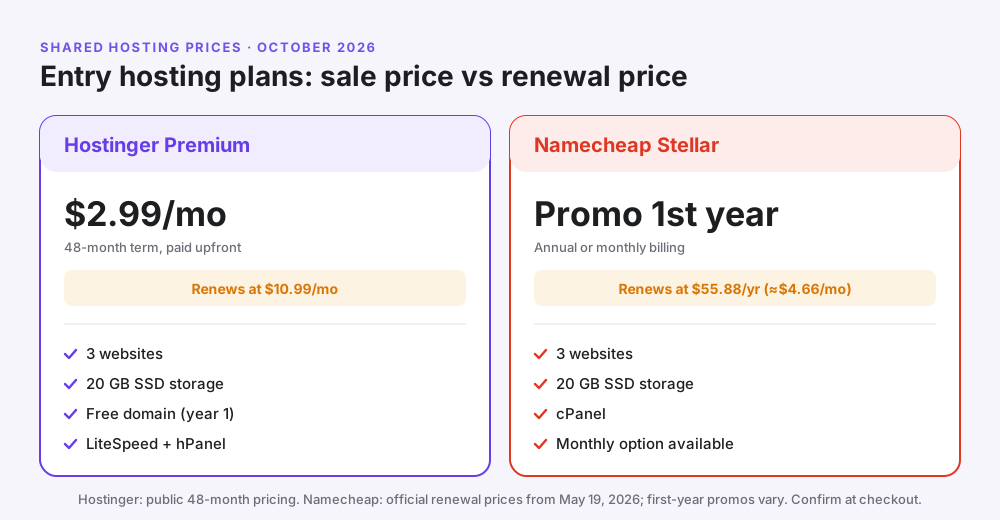
- Hostinger $2.99/mo (48 mo) · Namecheap promo, then $55.88/yr
- Control panel
- Hostinger hPanel · Namecheap cPanel
- Free domain with hosting
- Hostinger: yes, year 1 (Premium+)
- Refund window
- 30 days at both
- Our verdict
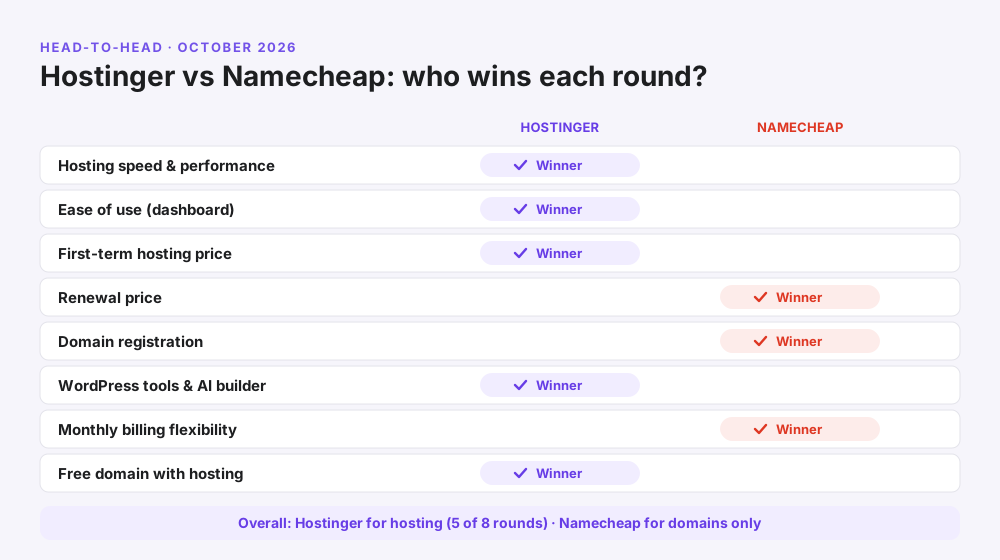
- Hostinger wins 5 of 8 rounds
In this comparison:
- Quick answer
- Hostinger vs Namecheap at a glance
- How we compared them
- Who are Hostinger and Namecheap?
- Hosting prices and renewals
- Speed and performance
- Ease of use: hPanel vs cPanel
- WordPress and website builders
- Cloud and VPS hosting
- Domains: prices, privacy and management
- Email hosting
- Security and backups
- Support and refunds
- Pros and cons
- Which is better for you? 6 scenarios
- Can you use both?
- Which is better in India?
- How to get started on Hostinger
- Common mistakes
- FAQs
Hostinger and Namecheap both look cheap on day one, both promise easy websites, and both appear in almost every “best budget host” list. So which one should you trust with your site?
The honest answer is that they are good at different things. Pick the wrong one and you either overpay at renewal or end up with a slow site that is hard to manage.
This Hostinger vs Namecheap comparison breaks it down round by round: price, speed, ease of use, WordPress, domains, email, security and support. By the end, you will know exactly which one fits your project.
Hostinger vs Namecheap at a glance
| Feature | Hostinger | Namecheap |
|---|---|---|
| Best known for | Fast, beginner-friendly web hosting | Domain registration |
| Entry hosting plan | Premium: $2.99/mo on 48 months | Stellar: first-year promo |
| Entry plan renewal | $10.99/mo | $55.88/yr (about $4.66/mo) |
| Websites on entry plan | 3 | 3 |
| Storage on entry plan | 20 GB SSD | 20 GB SSD |
| Web server | LiteSpeed with built-in caching | Standard shared servers |
| Control panel | hPanel (custom, simple) | cPanel (industry standard) |
| Free domain with hosting | Yes, first year (Premium and up) | Check current offer |
| Website builder | AI website builder included | Basic site builder |
| Monthly billing | Available but costly | Available |
| Money-back guarantee | 30 days | 30 days |
| Support | 24/7 chat and email | 24/7 chat and tickets |
How we compared Hostinger and Namecheap
We compared the two in October 2026 across eight areas that matter most to someone buying hosting or a domain: price, renewal cost, speed, ease of use, WordPress tools, domains, security and support.
Prices come from each company’s public pricing pages and Namecheap’s own renewal price notice. We judged each feature for a typical small business or blog, not for large enterprise sites.
One rule we kept: we compared like with like. That means each company’s entry shared hosting plan first, then the step-up plans, and we always looked at renewal prices as well as sale prices.
Who are Hostinger and Namecheap?
Hostinger is a web hosting company founded in 2004 in Lithuania. It focuses on affordable hosting with its own control panel (hPanel), LiteSpeed servers, AI tools and a large global customer base.
Namecheap is a US-based company founded in 2000 and is best known as a domain registrar. It added shared hosting, email and SSL certificates later, so hosting is a side business rather than its core product.
Why it matters: a company tends to be strongest at its main product. Hostinger invests most in hosting speed and tools; Namecheap invests most in domains and DNS.
Hosting prices and renewals
Hostinger is cheaper upfront on long terms; Namecheap is cheaper at renewal. That single trade-off decides the price round for most buyers.
Hostinger shared hosting plans (US prices)
| Plan | Sale price | Renews at | Websites | Storage | Backups |
|---|---|---|---|---|---|
| Premium ⭐ | $2.99/mo | $10.99/mo | 3 | 20 GB SSD | Weekly |
| Unlimited (Business) | $3.99/mo | $16.99/mo | Unlimited | 50 GB NVMe | Daily |
| Cloud Startup | $7.99/mo | $25.99/mo | Unlimited | 100 GB NVMe | Daily + on demand |
Namecheap shared hosting plans
| Plan | Renewal (1 year) | Renewal (1 month) | Websites | Storage |
|---|---|---|---|---|
| Stellar | $55.88/yr | $5.88/mo | 3 | 20 GB SSD |
| Stellar Plus | $85.44/yr | $7.88/mo | Unlimited | Unmetered SSD |
| Stellar Business | $128.88/yr | $11.88/mo | Unlimited | 50 GB SSD |
What you really pay over five years
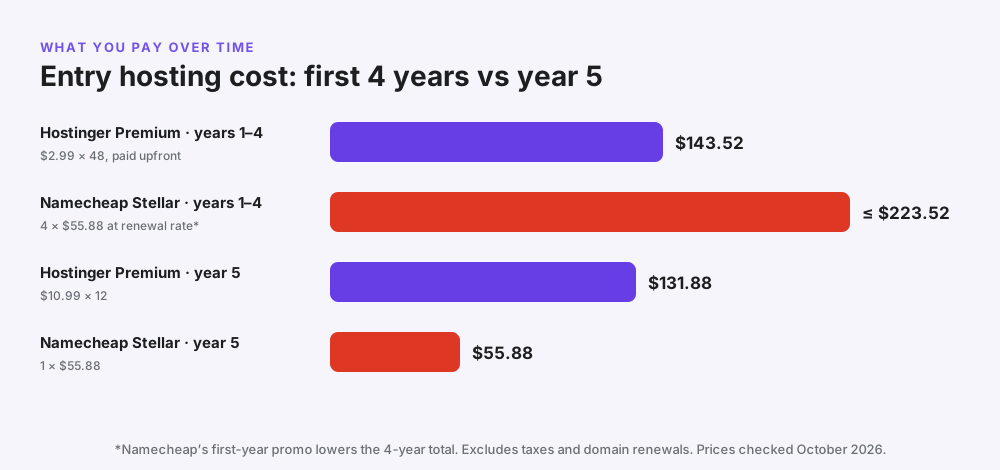
Hostinger Premium costs $143.52 for four years, and you also get a free domain for the first year. Namecheap Stellar costs up to $223.52 for the same four years at its renewal rate, less after its first-year promo.
From year five, the picture flips. Hostinger Premium renews at $131.88 a year, while Namecheap Stellar renews at $55.88 a year.
Pro tip: most sites change, grow or move host within four years. That makes Hostinger’s long-term upfront price the better deal for most new websites, as long as you plan for the renewal.
Indian readers: Hostinger’s Premium plan costs ₹149 a month on 48 months, with a server in Mumbai. See our Hostinger India review for rupee prices and GST.
Speed and performance
Hostinger is usually faster for WordPress sites because it runs LiteSpeed web servers with the LiteSpeed Cache plugin, plus NVMe storage on higher plans. Pages are cached and served quickly without extra setup.
Namecheap’s shared hosting is reliable for small, simple sites, but it doesn’t include the same built-in LiteSpeed caching. You can still speed it up with a caching plugin and a CDN, but it takes more work.
| Speed factor | Hostinger | Namecheap |
|---|---|---|
| Web server | LiteSpeed | Standard shared stack |
| WordPress caching | LiteSpeed Cache, built in | Add a plugin yourself |
| Storage type | SSD, NVMe on higher plans | SSD |
| Data centre choice | Several regions, including the US, Europe and Asia | US, UK and Europe |
| Uptime guarantee | 99.9% | Uptime guarantee with service credits |
Best practice: whichever host you choose, pick the data centre closest to your visitors and test your homepage with Google PageSpeed Insights after launch.
Winner: Hostinger. For most WordPress and business sites, Hostinger’s LiteSpeed setup gives faster pages with less effort.
Ease of use: hPanel vs cPanel
Hostinger uses hPanel, its own clean dashboard. Namecheap uses cPanel, the long-standing industry standard.
| Hostinger hPanel | Namecheap cPanel | |
|---|---|---|
| Look and feel | Modern and simple | Familiar but busy |
| Best for | Beginners | People who already know cPanel |
| WordPress install | A few clicks with a setup wizard | Softaculous installer |
| AI help | Kodee AI assistant | No built-in AI assistant |
| Moving to another host later | Hostinger-specific | Easy, since many hosts use cPanel |
When cPanel is better: if you have used cPanel for years or plan to move hosts often, Namecheap’s familiar panel can save time.
Winner: Hostinger for beginners. Most first-time site owners find hPanel easier to learn.
WordPress and website builders
Both hosts can run WordPress, but Hostinger offers more tools built around it.
- Hostinger: one-click WordPress with a setup wizard, LiteSpeed Cache, automatic updates, staging on higher plans, and an AI website builder for people who don’t want WordPress.
- Namecheap: WordPress through the Softaculous installer, plus a simpler site builder. It also sells managed WordPress hosting (EasyWP) as a separate product.
New to WordPress? Our guide on how to create a WordPress website walks you through the setup on Hostinger. Not sure what kind of hosting you need? Read WordPress hosting vs web hosting.
Namecheap’s plans are listed on its shared hosting page if you want to compare them yourself.
Winner: Hostinger. Start a WordPress site on Hostinger if you want the smoothest setup.
Cloud and VPS hosting
Shared hosting is where most people start, but both companies offer bigger plans when your site grows.
- Hostinger offers cloud hosting (Cloud Startup and up) that you manage in the same simple hPanel, plus KVM VPS plans for developers who want root access.
- Namecheap offers VPS plans and dedicated servers, managed with familiar tools, plus EasyWP managed WordPress hosting.
When to upgrade: move to cloud or VPS hosting when your site regularly gets more than about 25,000 visits a month, runs a busy online store, or keeps hitting resource limits.
Our take: Hostinger’s cloud plans are the easier upgrade for non-technical owners, because nothing changes in the dashboard. For larger sites, managed cloud hosts such as Cloudways are also worth a look.
Domains: prices, privacy and management
Namecheap wins the domain round. It is a domain specialist with a huge choice of extensions, a clean domain dashboard, strong DNS tools and free WHOIS privacy on eligible domains.
Hostinger also sells domains and includes a free domain for the first year with Premium and higher hosting plans. For a single domain used with Hostinger hosting, that free year often makes Hostinger cheaper overall.
| Domain feature | Hostinger | Namecheap |
|---|---|---|
| Free domain with hosting | Yes, year 1 (Premium and up, 12+ month terms) | Check current offer |
| .com renewal | Standard renewal price, roughly $15–$20 a year | Standard renewal price, roughly $15–$20 a year |
| WHOIS privacy | Free on supported domains | Free on supported domains |
| Choice of extensions | Wide | Very wide |
| DNS and bulk tools | Good | Excellent |
| Best for | One or two domains with hosting | Domain portfolios, investors, developers |
Common mistake: comparing only first-year domain prices. A $1 first year means little if the renewal is higher, so always check the renewal price.
Email hosting
Both hosts let you create email addresses on your own domain, such as hello@yourbusiness.com.
- Hostinger includes email mailboxes with its hosting plans for the first year, and sells Hostinger Business Email separately.
- Namecheap includes mailboxes with its shared hosting and sells Private Email as a separate, low-cost product.
Pro tip: for a business, set up SPF, DKIM and DMARC records so your emails don’t land in spam. Both dashboards make this straightforward.
Result: a tie. Both are fine for small business email.
Security and backups
| Feature | Hostinger | Namecheap |
|---|---|---|
| Free SSL | Yes, every site | Yes, on hosting plans |
| Backups | Weekly on Premium, daily on Unlimited and Cloud | AutoBackup on higher Stellar plans |
| Malware protection | Malware scanner included | Security tools included; extras sold separately |
| Firewall and DDoS protection | Included | Included |
Best practice: on plans with weekly backups, make a manual backup before updating themes or plugins.
Winner: Hostinger, slightly, thanks to the built-in malware scanner and daily backups on Hostinger’s Unlimited plan.
Customer support and refunds
Both companies offer 24/7 support by live chat, and neither offers phone support for hosting.
- Hostinger: 24/7 live chat and email, with the Kodee AI assistant answering simple questions first.
- Namecheap: 24/7 live chat and a ticket system, plus a large knowledge base.
- Refunds: both offer a 30-day money-back guarantee on hosting. Domain registrations are generally not refundable.
Result: a tie. Both have helpful, round-the-clock chat support.
Hostinger vs Namecheap: pros and cons
| Pros | Cons | |
|---|---|---|
| Hostinger | Fast LiteSpeed servers; easy hPanel; free domain year 1; AI builder; low 48-month price | Higher renewal; best prices need long terms; no phone support |
| Namecheap | Excellent for domains; cheap renewals; cPanel; monthly billing | Fewer WordPress speed tools; first-year promos vary; no phone support |
Which is better for you? 6 real-world scenarios
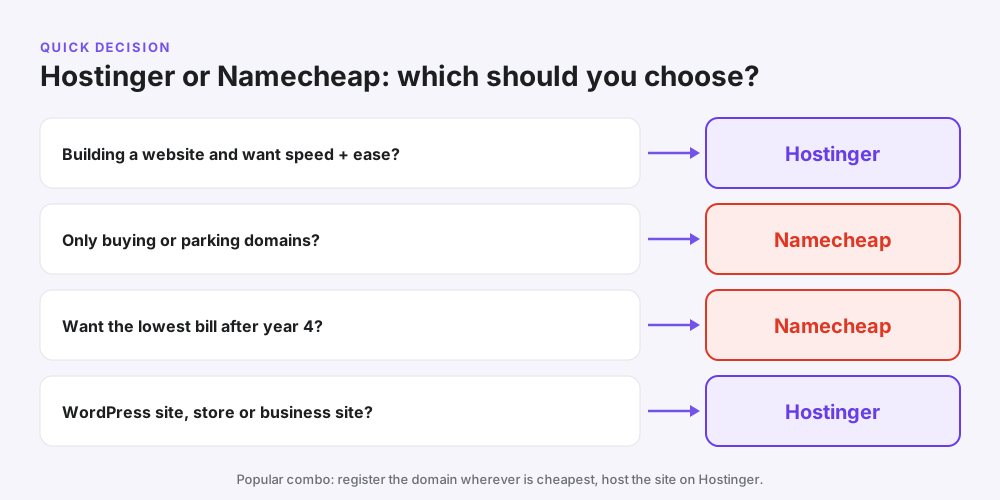
| Your situation | Best choice | Why |
|---|---|---|
| Starting your first blog | Hostinger | Easy setup, speed and a free domain; see our guide to starting a blog |
| Small business website | Hostinger | Fast pages, email and an AI builder in one plan |
| Buying or parking domains only | Namecheap | Domain specialist with strong tools |
| Want the lowest yearly bill after year 4 | Namecheap | Cheaper renewal on Stellar |
| Online store (WooCommerce) | Hostinger Cloud Startup | More resources and daily backups |
| Developer who prefers cPanel | Namecheap | Familiar panel, easy to move later |
Example: a freelance designer in Texas needs a portfolio, a contact form and a professional email. Hostinger Premium covers all three, including the domain for year one, for $143.52 over four years.
Example: a startup founder owns 15 domains for future projects. Namecheap’s bulk domain tools and renewals make it the easier home for that portfolio.
Can you use Hostinger and Namecheap together?
Yes, and many people do. You can register a domain at Namecheap and host the website on Hostinger by pointing the domain’s nameservers to Hostinger.
- Buy or keep your domain at Namecheap.
- Buy a hosting plan at Hostinger and add your domain in hPanel.
- Copy Hostinger’s nameservers from hPanel.
- In Namecheap, go to Domain List, Manage, Nameservers, and choose Custom DNS.
- Paste Hostinger’s nameservers and save. Changes usually work within a few hours.
When to keep it simple: if you have just one website, claiming Hostinger’s free domain keeps everything in one dashboard and saves the first year’s domain fee.
Hostinger vs Namecheap: which is better in India?
For Indian websites, Hostinger is the clear choice. It has a data centre in Mumbai, charges in rupees, accepts UPI and starts at ₹149 a month for Premium on a 48-month term.
Namecheap bills in US dollars and its hosting data centres are in the US, UK and Europe, so pages may load more slowly for visitors in India. It is still a good place to buy a .com domain if you prefer it.
See our Hostinger India review for full rupee prices, GST and renewal costs, or our list of the best hosting in India.
How to get started on Hostinger
- Open Hostinger through our link and choose Premium (or Unlimited for more sites).
- Choose the 48-month term for the lowest monthly price.
- Create your account and pay by card, PayPal or another available method.
- Claim your free domain or connect one you already own, including a Namecheap domain.
- Install WordPress or use the AI website builder, then go live.
Moving an existing site from Namecheap? Hostinger offers free website migration, and you can request it from hPanel after you buy.
Want to save a little more? Check our Hostinger coupon code page before you pay.
Common mistakes when choosing between them
- Judging only on the first-year price. Compare four-year and renewal costs.
- Buying hosting just because you bought a domain there. Domains and hosting don’t have to be with the same company.
- Choosing monthly billing to “test”. Use the 30-day refund instead; monthly terms cost far more.
- Ignoring server location. Pick the data centre closest to your visitors.
- Forgetting to renew domains. Turn on auto-renew so your site never goes offline.
- Skipping backups. Take manual backups before big changes on weekly-backup plans.
Frequently asked questions
Which is better, Hostinger or Namecheap?
For website hosting, Hostinger is better for most people thanks to faster LiteSpeed servers, an easier dashboard and a free domain for the first year. For buying and managing domains only, Namecheap is the better choice.
Is Hostinger cheaper than Namecheap?
On long terms, yes: Hostinger Premium costs $2.99 a month for 48 months. At renewal, Namecheap is cheaper, with Stellar renewing at $55.88 a year compared with $10.99 a month for Hostinger Premium.
Is Namecheap good for hosting?
Namecheap hosting is fine for small, simple websites and people who like cPanel. It is less optimised for WordPress speed than Hostinger, so busy or growing sites usually do better on Hostinger.
Is Namecheap good for domains?
Yes. Namecheap is one of the most popular domain registrars, with a wide choice of extensions, free WHOIS privacy on eligible domains and good DNS tools.
Is Hostinger faster than Namecheap?
For WordPress sites, Hostinger is generally faster because it uses LiteSpeed web servers with built-in caching and NVMe storage on higher plans.
Does Hostinger give a free domain?
Yes. Premium and higher Hostinger plans include a free domain for the first year on 12-month or longer terms. It renews at the normal price after that.
Can I use a Namecheap domain with Hostinger hosting?
Yes. Add the domain in Hostinger’s hPanel, then change the domain’s nameservers in Namecheap to the ones Hostinger gives you.
Which is better for WordPress, Hostinger or Namecheap?
Hostinger, because it offers a WordPress setup wizard, LiteSpeed Cache, automatic updates and staging on higher plans.
Does Namecheap use cPanel?
Yes. Namecheap shared hosting uses cPanel. Hostinger uses its own control panel, hPanel.
Do Hostinger and Namecheap offer refunds?
Both offer a 30-day money-back guarantee on hosting plans. Domain registrations are generally not refundable.
Which has better customer support?
Both offer 24/7 live chat and neither offers phone support for hosting. Hostinger adds email support and an AI assistant; Namecheap adds a ticket system.
Is Namecheap or Hostinger better for a small business?
Hostinger is usually better for a small business website because of its speed, simple dashboard, included email and AI website builder.
Can I pay monthly at Hostinger and Namecheap?
Both offer monthly billing, but monthly prices are much higher than long-term prices, especially at Hostinger.
How do I move my site from Namecheap to Hostinger?
Buy a Hostinger plan and request a free website migration from hPanel. Then point your domain’s nameservers to Hostinger.
Hostinger vs Namecheap vs GoDaddy: which is cheapest?
For hosting on long terms, Hostinger is usually the cheapest of the three. For domain renewals, Namecheap is usually cheaper than GoDaddy. Always compare renewal prices, not just first-year deals.
Related reading
- Hostinger India review 2026
- Best web hosting for beginners
- Hostinger coupon code
- WordPress hosting vs web hosting
- Cloudways review
- Kinsta review
Conclusion: Hostinger vs Namecheap, the final verdict
In the Hostinger vs Namecheap battle, the right choice depends on what you are buying. For a website, Hostinger wins on speed, ease of use, WordPress tools and first-term value. For domains alone, Namecheap is the specialist.
Many people get the best of both: they keep domains at Namecheap and host their websites on Hostinger. If you want one simple dashboard, start with Hostinger Premium and claim the free domain.
Once your site is live, bring in visitors. GetToMarketing is a Meta Ads agency, and our guide to Facebook ads for small business shows how to win your first customers.